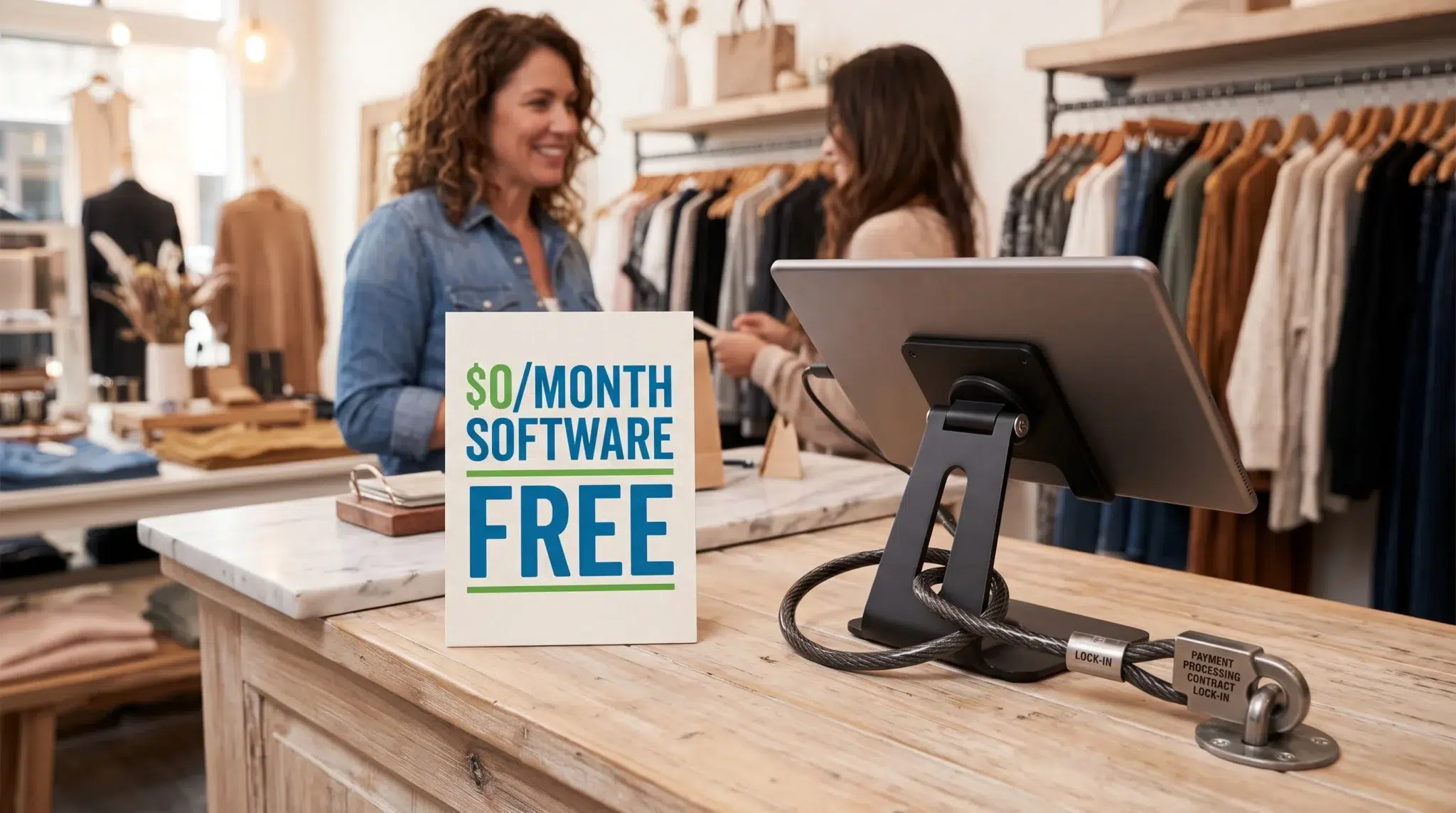

Selecting the right point-of-sale platform directly influences sales floor agility, inventory precision, and annual operating margins. When evaluating shopify vs biyo, store owners encounter two fundamentally distinct software philosophies. Shopify began as an e-commerce website engine built to process online shopping carts, print parcel shipping labels, and manage digital storefronts, later adapting its web platform for physical retail counters. In contrast, Biyo was engineered from the ground up as an open, cloud-native commerce operating system designed to manage physical sales counters, mobile floor operations, and hybrid food service environments.
Consequently, retail operators must look past high-level marketing claims to understand how each system performs during peak sales hours. While Shopify delivers an established platform for online parcel shipping, its physical store solution introduces mandatory per-location subscription fees, locked hardware ecosystems, third-party app fatigue, and payment processing penalties. Modern multi-device platforms, however, build critical operational tools—such as product age verification, EBT acceptance, kitchen ticket routing, customer loyalty, and mobile inventory auditing—directly into the core operating engine.
This comprehensive operational guide breaks down shopify vs biyo across hardware flexibility, modular switchboard architecture, sales floor mobility, specialized retail compliance, payment processing economics, and omnichannel ordering.
Table of Contents
- E-Commerce Extension vs. Modular Cloud Architecture
- Hardware Freedom: Universal Browsers vs. Locked Terminals
- The Modular Switchboard: Native Toggles vs. App Store Clutter
- Specialized Retail: Age Restrictions, EBT, and Custom Fields
- Side-by-Side Comparison
- Inventory Control: Overcoming Variant Limits and Mobile Auditing
- Hybrid Concepts: Managing Modifiers, Kitchen Displays, and Delivery Sync
- Total Cost of Ownership: Paywalls and Payment Processor Freedom
- Omnichannel Sales: Commission-Free Ordering and eCommerce Growth
- Streamlining Store Operations with Biyo POS
- Frequently Asked Questions
E-Commerce Extension vs. Modular Cloud Architecture
The underlying software codebase of a point-of-sale system determines how efficiently sales associates ring up customer transactions under pressure. When an online shopping cart is adapted for retail counters, web menus often slow down physical checkout lanes.
Understanding these architectural roots explains why touchscreen responsiveness and register navigation vary significantly between web-first and counter-first platforms.
The Web-First Dilemma: Nested Menus and Register Queue Friction
Shopify established its reputation by powering digital storefronts. Its core data models were engineered around web browser interactions: customers browse product collections, click through drop-down variant selectors, add items to digital carts, and wait for remote cloud validation. When Shopify adapted this architecture for retail checkout counters, it brought those same web-centric hierarchies to physical touchscreens.
On the sales floor, this design creates immediate friction. Cashiers must frequently navigate through multi-layered department trees, secondary modal popups, and nested variant screens simply to ring up standard items. Furthermore, web-adapted systems rely on persistent server communication to validate discounts, customer loyalty profiles, and tax calculations. If local broadband speeds fluctuate, cashier screens experience noticeable input latency. During a busy Saturday afternoon rush, an extra five seconds spent navigating menus on every transaction quickly causes checkout lines to spill into sales floor aisles.
Modular Cloud Architecture: Local Caching and Instant Floor Agility
A purpose-built physical commerce platform approaches sales counter interactions with a focus on speed and ergonomics. Biyo’s cloud architecture organizes catalog navigation around high-frequency touch zones, instant visual search, and single-tap SKU selection. Cashiers scan physical barcodes or tap dedicated category shortcut buttons without waiting for browser pages to reload.
Furthermore, Biyo maintains robust local device caching directly within the client terminal session. Cashiers can apply line-item adjustments, assign customer profiles, split payments, and hold transactions with immediate on-screen visual confirmation. By processing register interactions locally before asynchronously syncing data to the cloud, the checkout interface remains completely responsive regardless of web traffic spikes. Cashiers keep lines moving quickly, ensuring that customer checkout times remain under five seconds even during peak holiday sales.
Hardware Freedom: Universal Browsers vs. Locked Terminals
Checkout hardware represents a major capital expenditure for independent storefronts. A flexible hardware ecosystem ensures that your equipment remains a durable, reusable business asset for years to come.
Comparing hardware procurement policies highlights the critical operational difference between closed vendor locks and open-standard commercial equipment.
Proprietary Terminals and the Hardware Lock-In Trap
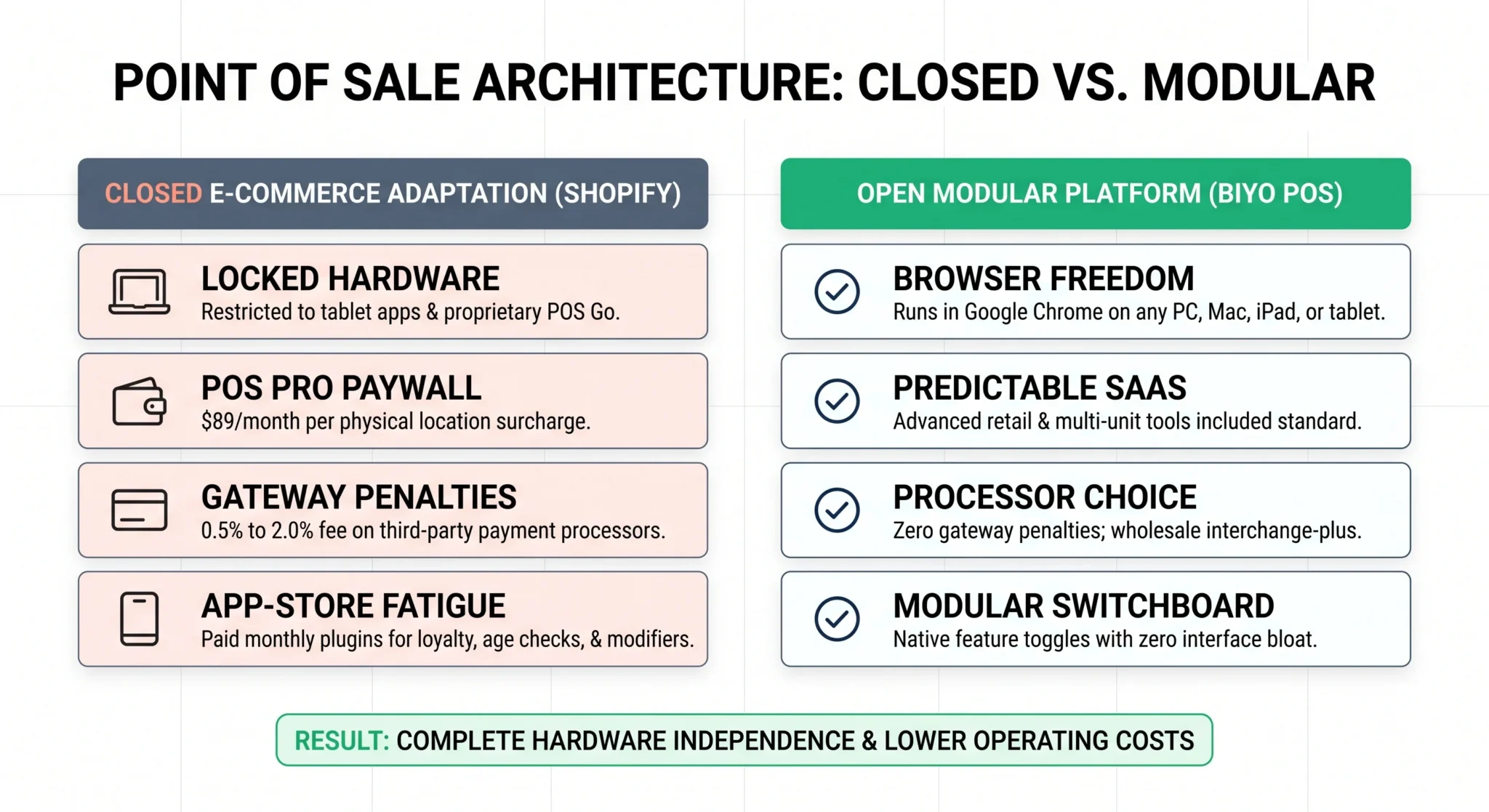
Shopify confines its retail checkout system to proprietary mobile applications built exclusively for Apple iOS and Android tablets, alongside dedicated handheld hardware like the Shopify POS Go. Crucially, Shopify POS cannot run directly inside a standard desktop web browser for register checkout operations. Store managers cannot simply open an existing desktop PC, Mac workstation, or laptop on the sales counter to ring up customers.
Moreover, Shopify hardware utilizes locked firmware tied strictly to its software network. If your business outgrows Shopify or decides to switch platforms, proprietary tablet enclosures, terminal docks, and POS Go devices cannot be reprogrammed or reused. Additionally, Shopify limits peripheral compatibility to an approved manufacturer list. This restriction routinely forces merchants to purchase thermal receipt printers and barcode scanners directly from Shopify’s hardware store at significant price markups.
Google Chrome Freedom, ESC/POS, and 24V Open Peripherals
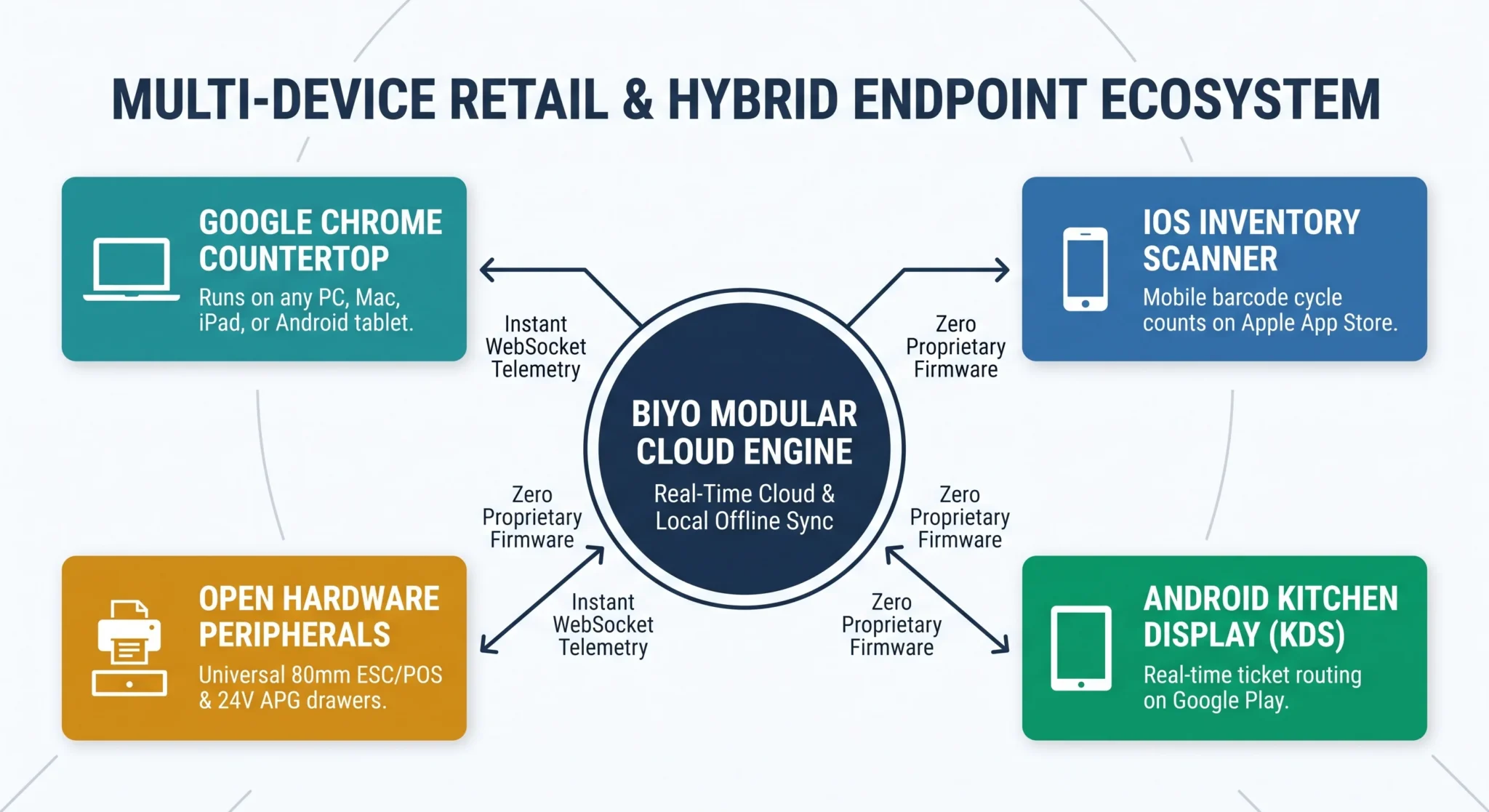
In sharp contrast, Biyo provides complete hardware independence by operating natively inside the Google Chrome web browser. Store owners can run Biyo on any PC, Mac, iPad, Android tablet, laptop, or customer-facing kiosk without installing proprietary software packages or managing complex operating system updates. If a countertop tablet breaks during a busy shopping rush, an employee can open Google Chrome on a backup laptop, log in, and resume processing customer sales in under sixty seconds.
Beyond screen independence, Biyo communicates with commercial, open-architecture retail peripherals via industry standards:
- Universal ESC/POS Thermal Receipt Printers: The browser sends raw print commands over local Ethernet LAN, Wi-Fi, or USB directly to standard 80mm thermal receipt printers without proprietary vendor drivers.
- Standard 24V APG Cash Drawers: Cash drawers connect straight to the printer’s drawer kick port using standard modular RJ11/RJ12 cables. When a cash sale is finalized in Chrome, the printer fires a 24V electrical pulse to open the drawer automatically.
- Commercial Barcode Scanners: Connect any 1D or 2D barcode imager via USB or Bluetooth in standard Human Interface Device keyboard emulation mode. The scanner inputs barcode strings directly into the active cart input field instantly.
- Sales Floor Mobility: Staff use standard iOS devices running the free Biyo Inventory Scanner app on the Apple App Store for mobile barcode auditing and stock receiving.
The Modular Switchboard: Native Toggles vs. App Store Clutter
The daily software experience at your sales counter depends heavily on how operational features are integrated into the point of sale. When platforms rely on third-party developer marketplaces, basic retail workflows often require managing disconnected third-party plugins.
Examining platform switchboard mechanics illustrates how native modular design keeps register interfaces clean while eliminating plugin subscription costs.
The App-Stack Tax: Third-Party Plugin Bloat and Modal Clutter
Shopify’s core software provides standard retail capabilities, relying on the Shopify App Store to supply specialized functionality. If an established storefront requires customer loyalty rewards, age verification checks, custom catalog attributes, or multi-location stock transfers, the merchant must search, install, and configure external third-party applications.
This reliance on external plugins creates significant operational challenges:
- Compounding Monthly App Subscriptions: Third-party plugins charge separate monthly fees ranging from $10 to $99 per month, causing recurring software overhead to escalate rapidly.
- Disjointed Cashier Screens: Third-party applications frequently open inside separate browser tabs or pop-up modals, forcing cashiers to switch screens during checkout.
- Administrative Menu Clutter: Cashiers and floor managers must navigate complex, generalized menus filled with fields and settings your business never uses.
The Biyo Switchboard: Clean Toggles and Zero Interface Bloat
In contrast, Biyo is engineered around a native modular switchboard architecture. Rather than requiring merchants to buy third-party plugins, Biyo embeds advanced capabilities directly into the core platform engine. Store managers simply toggle specific modules on or off with a single switch.
Active modules include Product Age Restrictions, Online Ordering, EBT Acceptance, Modifiers, Custom Fields, Rewards & Loyalty, Gift Cards, Advanced Stock Tracking, Kitchen Printing, and upcoming eCommerce parcel tools. When a module—such as Modifiers or Kitchen Printing—is turned off, all related fields, buttons, and submenus disappear completely from your registers and dashboard. This ensures that cashiers only interact with the exact tools needed for their specific store environment, maximizing register speed and eliminating user confusion.
Specialized Retail: Age Restrictions, EBT, and Custom Fields
Many physical storefronts operate within specialized or regulated retail sectors that require specific compliance tools directly at the counter. While traditional apparel boutiques focus on matrix sizes, neighborhood bodegas, bottle shops, and health retailers have strict compliance requirements.
Examining native compliance modules highlights how purpose-built platforms support regulated transactions without requiring expensive third-party software.
Product Age Restrictions and Regulated Item Compliance
Retailers selling age-regulated merchandise—such as craft beer, fine wine, tobacco, vape accessories, or CBD—must comply with strict local and federal age verification laws. On Shopify, enforcing age checks requires purchasing third-party applications that often slow down the touchscreen checkout flow.
Biyo includes a native Product Age Restrictions module built directly into the catalog engine:
- Configurable Minimum Age Limits: Assign verification rules for 16+, 18+, 21+, or custom ages directly to individual SKUs or entire product departments.
- Automated Cashier Lockout Prompts: Scanning an age-restricted item triggers an immediate register prompt requiring the cashier to verify customer identification before proceeding.
- Custom Fields for Specialized Attributes: Define unique attributes across your catalog—such as garment fabric compositions, designer identifiers, expiration dates, or batch serial numbers—directly in product lookups and on printed receipts.
Native EBT Acceptance for Grocery and Market Retailers
For neighborhood grocers, markets, and specialty food stores, accepting government assistance benefits is critical for serving their local community. Shopify POS does not natively support EBT (Electronic Benefit Transfer) or SNAP tender splits at checkout.
Biyo features an integrated EBT Acceptance module that allows merchants to accept EBT and SNAP benefits seamlessly at checkout. The system automatically identifies eligible food items versus non-eligible dry goods on a single customer ticket. The register splits the transaction smoothly, routing eligible grocery totals to the customer’s EBT card while allowing remaining merchandise to be finalized with cash, credit, or debit.
Side-by-Side Comparison
| Operational Category | Shopify POS | Biyo POS |
|---|---|---|
| System Architecture | E-commerce website builder adapted for physical retail | Cloud-native, multi-device POS with modular feature toggles |
| Register Environment | Restricted to proprietary iOS/Android apps and locked POS Go | Runs natively in Google Chrome on PC, Mac, iPad, Android, and kiosks |
| Peripheral Freedom | Limited to an approved manufacturer list of peripherals | Universal support for standard 80mm ESC/POS printers and 24V APG drawers |
| Modular Feature Management | Relies on third-party app plugins with stacking monthly fees | Native modular switchboard; disable unused features to declutter UI |
| Specialized Regulated Retail | Requires third-party apps for age gates and compliance verification | Built-in Product Age Restrictions module (16+, 18+, 21+, or custom) |
| Government Benefit Support | No native EBT/SNAP split tender support at checkout | Native EBT Acceptance module for groceries, bodegas, and markets |
| Stock & Inventory Auditing | 100-variant limit; relies on third-party apps for mobile cycle counts | Free Biyo Inventory Scanner app on Apple App Store; lot & location tracking |
| Hospitality & Kitchen Workflows | No native KDS; relies on complex third-party app extensions | Native Kitchen Printing, modifier groups, and Biyo KDS app on Google Play |
| Delivery App Aggregation | No native aggregation; requires separate third-party counter tablets | Direct Kitchen Hub integration consolidates DoorDash, Uber Eats, and Grubhub |
| Payment Processing Freedom | 0.5% to 2.0% penalty fee applied to external payment gateways | Zero gateway penalty fees; complete payment processor choice |
| Software Pricing Model | Base plan + mandatory $89/mo per location for POS Pro | Predictable SaaS pricing with advanced retail and multi-unit tools included |
| Online Sales Capabilities | Full e-commerce website builder with liquid template customization | Built-in commission-free Online Ordering; full eCommerce module launching soon |
| Offline Mode Resilience | Basic offline transaction capture with manual reconciliation | Resilient offline local caching for sales, printers, cash drawers, and scales |
Inventory Control: Overcoming Variant Limits and Mobile Auditing
Accurate inventory management protects retail profitability. Without real-time stock visibility and rapid mobile intake tools, physical storefronts face frequent stockouts, miscounted variants, and inventory shrinkage.
Evaluating catalog architecture shows how purpose-built platforms simplify inventory audits and manage complex matrix catalogs.
The 100-Variant Ceiling and Spreadsheet Fatigue
Managing complex apparel or footwear catalogs can be challenging on Shopify. Shopify enforces a strict platform limit of 100 variants and 3 option dimensions per product (such as Size, Color, and Cut). If an apparel boutique stocks a dress available in 5 sizes, 6 colorways, and 4 fabric choices, that single item requires 120 unique SKUs, immediately exceeding Shopify’s platform ceiling. Retailers must either split the dress into multiple confusing product listings or purchase expensive third-party apps to bypass the restriction.
Furthermore, executing physical stock audits on the sales floor is cumbersome. Shopify does not provide a native mobile cycle counting tool, requiring store associates to export CSV spreadsheets, record physical counts with paper clipboards, and manually type numbers back into the system. This manual process increases administrative errors, delays stock receiving, and leaves sales floor numbers out of sync.
Mobile Auditing, Variant Matrices, and Advanced Lot Tracking
A modern retail operations engine handles extensive product variations natively. Biyo allows merchants to build deep variant matrices without artificial option ceilings, keeping parent-child product relationships organized under a single SKU structure.
In addition, Biyo provides advanced inventory workflows directly on the retail floor:
- Biyo Inventory Scanner App (iOS): Staff download the companion scanner app directly onto an iPhone or iPad from the Apple App Store. Associates walk store aisles, scan barcode hangtags using the device camera or a paired Bluetooth scanner, and conduct physical cycle counts instantly.
- Advanced Stock Tracking: The native Advanced Stock Tracking module provides lot- and location-based tracking. Retailers manage batch numbers, expiration dates, backroom storage bins, and shelf coordinates effortlessly.
- Real-Time Stock Receiving: When delivery boxes arrive, staff scan inbound merchandise to update inventory levels across counter registers and online ordering menus instantly.
Hybrid Concepts: Managing Modifiers, Kitchen Displays, and Delivery Sync
Modern physical commerce increasingly blurs the line between traditional retail and hospitality. Apparel boutiques now feature in-house coffee bars, bookshops operate bistros, and bakeries sell branded apparel and retail merchandise.
Managing these hybrid concepts requires a point-of-sale platform that processes dry goods and kitchen tickets simultaneously.
Shopify Gaps in Food and Beverage Workflows
Because Shopify was designed exclusively for packaged retail goods, it lacks native hospitality features. It offers no built-in Kitchen Display System (KDS), no multi-station ticket splitting, and no dedicated modifier menus for food and beverage customizations:
- No Native Kitchen Routing: If your retail boutique operates a coffee counter, Shopify cannot route beverage tickets directly to a preparation screen behind the counter without paid third-party add-ons.
- Slow Modifier Selection: Customizing a drink with almond milk or sugar-free syrup requires navigating standard retail variant menus, adding unnecessary taps that slow down customer queues.
- Delivery App Clutter: Shopify POS cannot aggregate third-party food delivery orders from DoorDash, Uber Eats, and Grubhub into kitchen prep workflows.
Unified Hybrid Tickets, Android KDS, and Kitchen Hub Delivery Sync
A versatile point of sale manages packaged merchandise and food-and-beverage preparation within a single customer transaction. With Biyo, cashiers can ring up a ceramic mug, a scented candle, and an iced vanilla latte on the exact same ticket.
The Modifiers module lets cashiers select sizes, milk alternatives, and flavor shots with a single tap. Simultaneously, the Kitchen Printing module routes beverage items directly to kitchen thermal printers or the Biyo Kitchen Display (KDS) app on Google Play. Furthermore, Biyo integrates directly with Kitchen Hub, consolidating incoming orders from DoorDash, Uber Eats, and Grubhub straight into your kitchen display without cluttering your front counter with separate delivery tablets.
Total Cost of Ownership: Paywalls and Payment Processor Freedom
While evaluating point-of-sale software requires reviewing daily operational features, understanding ongoing cost structures ensures your business maintains healthy profit margins. Evaluating software licensing and payment terms clarifies the true cost of operating your storefront.
Examining recurring fees highlights the difference between closed commercial networks and transparent SaaS economics.
The Compounding Cost of Shopify POS Pro and Gateway Surcharges
Shopify divides its physical store functionality into two tiers: POS Lite and POS Pro. POS Lite is included with standard online subscriptions ($39 to $399 per month). However, POS Lite lacks essential retail tools required by established storefronts, such as staff roles, stock transfers, purchase orders, and daily cash tracking.
To access standard in-store management features, retailers must purchase the Shopify POS Pro add-on:
- Mandatory Per-Location Surcharge: Shopify charges an additional $89 per month for every physical store location.
- Escalating Multi-Store Costs: A business with three physical stores pays an extra $267 every month ($3,204 per year) strictly for POS Pro licenses, on top of base website hosting fees.
- Third-Party Gateway Surcharge: If you choose an outside merchant services provider, Shopify levies an additional 0.5% to 2.0% penalty fee on every transaction, financially pressuring merchants to remain within its proprietary payment aggregator.
Predictable Software Economics and Processing Choice
In contrast, transparent retail platforms provide enterprise-grade capabilities within their standard software pricing. Rather than locking multi-location stock transfers, staff permissions, or purchasing tools behind per-location paywalls, an all-inclusive system delivers these features standard.
Furthermore, open retail systems grant store owners complete payment freedom. Instead of locking merchants into flat aggregator fees or charging penalties for outside gateways, open platforms support flexible merchant acquiring options—including wholesale interchange-plus pricing or compliant cash discount programs. By eliminating arbitrary gateway surcharges, independent merchants retain full control over their payment terms and protect their annual sales margins.
Omnichannel Sales: Commission-Free Ordering and eCommerce Growth
Modern consumers expect to browse catalogs online and pick up orders in-store. Choosing the right omnichannel setup depends on whether your store requires local customer ordering or complex global parcel logistics.
Evaluating online sales models clarifies how each system bridges the digital and physical sales floor.
Full E-Commerce Maintenance vs. Streamlined Local Sales
Shopify is a dedicated website builder that offers extensive digital design capabilities. However, running a complete Shopify web store often involves managing liquid code templates, paying recurring app store subscriptions, and coordinating separate fulfillment flows.
For brick-and-mortar storefronts focused primarily on in-person sales, this setup can introduce significant maintenance overhead. Store managers frequently spend hours troubleshooting plugin conflicts and tracking parcel shipments instead of serving retail floor customers.
Commission-Free Online Ordering and Built-In eCommerce
Biyo approaches omnichannel commerce through a built-in Online Ordering module engineered specifically for local store pickup and takeout. Enabled with a single toggle, this feature allows customers to place orders online directly from your digital catalog with zero added commissions.
Online orders flow directly to your register counter in real time, synchronizing inventory instantly to prevent duplicate sales. For retailers planning to launch nationwide parcel shipping, Biyo is also rolling out a dedicated eCommerce module featuring automated SEO metadata, package measurements, and integrated carrier shipping rates. Furthermore, pre-built integrations for WooCommerce, Zapier, Make.com, and Xero ensure smooth connections with your existing business tools.
Streamlining Store Operations with Biyo POS
Biyo POS provides an open, cloud-based commerce operating system that runs smoothly inside the Google Chrome browser on any PC, Mac, iPad, Android tablet, or self-service kiosk, eliminating proprietary hardware lock-in and per-location software fees. Engineered with an intuitive modular switchboard, Biyo lets you activate the exact tools your store needs—including Product Age Restrictions, EBT Acceptance, Modifiers, Kitchen Printing, Rewards & Loyalty, Gift Cards, and Advanced Lot Tracking—while keeping unused features cleanly hidden from your registers. With commission-free Online Ordering, real-time stock sync, zero payment gateway penalty fees, the free Biyo Inventory Scanner app on the Apple App Store, and the Biyo Kitchen Display (KDS) app on Google Play, Biyo equips modern retail and hybrid storefronts with complete operational freedom. To see how much time and recurring software expense an open point-of-sale platform can save your business, you can schedule a live demo with an onboarding consultant or get started immediately on the Biyo signup page.
Frequently Asked Questions
What is the primary difference between Shopify POS and Biyo POS?
Shopify POS is an e-commerce platform adapted for retail counters that requires paid monthly add-ons for advanced retail features, whereas Biyo POS is a modular, multi-device operating system built for physical retail, hybrid stores, and food service with all core capabilities included.
Can I run Biyo POS on my existing computers or tablets?
Yes. Biyo POS operates smoothly inside the Google Chrome web browser on any standard PC, Mac, iPad, Android tablet, or laptop without requiring proprietary register terminals.
How does Biyo’s modular switchboard work?
Biyo features a toggle-based dashboard that lets store owners turn specific capabilities—like EBT acceptance, age verification, and kitchen printing—on or off with a single click, keeping register menus clean and focused only on the tools your store uses.
Does Biyo POS support mobile inventory cycle counting on the sales floor?
Yes. Biyo POS provides a free companion application—the Biyo Inventory Scanner on the Apple App Store—enabling staff to scan barcodes, receive stock shipments, and perform full cycle counts directly from an iPhone or iPad.
Can Biyo POS accept EBT and SNAP benefits at checkout?
Yes. Biyo includes a native EBT Acceptance module that allows grocery, bodega, and market merchants to accept EBT and SNAP benefits alongside traditional credit, debit, and cash payments.
Does Shopify charge a penalty fee for using third-party payment processors?
Yes. Shopify imposes a transaction surcharge penalty ranging from 0.5% to 2.0% on all sales processed through external payment gateways instead of Shopify Payments.
Can Biyo POS support retail stores that operate an attached cafe or food line?
Yes. Biyo natively supports hybrid concepts through its dedicated Kitchen Display System (KDS) app on Google Play, Kitchen Printing module, and Kitchen Hub integration, routing food and drink tickets to prep screens while ringing up retail merchandise on the same ticket.