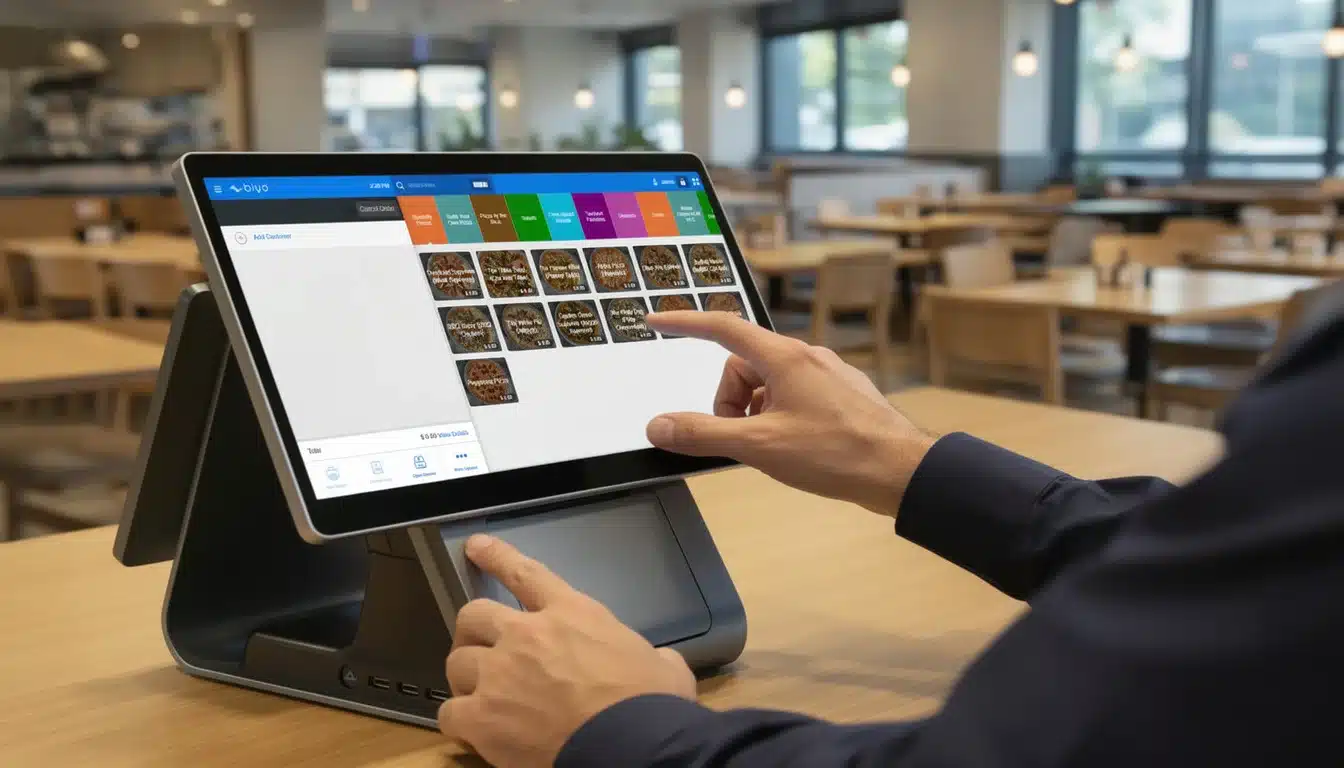
In today’s rapidly evolving retail and restaurant landscapes, the choice of a point-of-sale (POS) system can make or break a business. For years, Clover dominated this space, building a strong customer base among small to medium-sized merchants. However, a clear shift is underway as many businesses actively seek Clover alternatives that offer greater flexibility, better support, and cost savings. Among these contenders, Biyo POS has emerged as a powerful Clover replacement, rapidly winning over merchants who want a more tailored, modern, and efficient solution. This article explores in depth how Biyo is taking over Clover customers by delivering superior features, enhanced user experience, and a smoother POS migration path—all while helping businesses thrive in a competitive marketplace.
Table of Contents
- Why Clover Users Are Looking for Alternatives
- The Appeal of Biyo for Clover Customers
- How POS Migration from Clover to Biyo Works
- Biyo vs Clover in Restaurant POS Comparison
- The Future of POS with Biyo
- FAQ
Why Clover Users Are Looking for Alternatives
Before diving into how Biyo is taking over Clover customers, it’s critical to understand why so many merchants are actively seeking Clover alternatives. While Clover earned a reputation for ease of use and wide availability, over time, business owners have encountered several challenges that make them question their loyalty. These challenges include escalating costs, limited customization, unsatisfactory support, and an interface that sometimes feels outdated. Let’s explore these in greater detail to see why a POS market shift is occurring.
The Hidden Costs of Using Clover
Many merchants are surprised when they tally the total cost of owning a Clover system. Initially, Clover’s hardware and software packages appear competitively priced, which is enticing for small businesses on tight budgets. However, the reality soon becomes apparent as hidden fees emerge. Monthly service charges, payment processing fees, costs for essential add-on apps, and even support fees contribute to a much higher overall expense than expected.
For example, a small café might start with a $47 monthly plan, but to unlock features like advanced inventory or employee management, they may need to upgrade to pricier plans or subscribe to third-party apps. These costs quickly add up, creating a financial burden. As a result, many businesses look for Clover replacements that offer transparent pricing without surprise fees.
Biyo POS directly addresses this pain point by offering clear, upfront pricing models that bundle necessary features together. Biyo also negotiates lower processing fees for merchants, meaning owners keep more of their hard-earned revenue. For small business owners managing tight margins, these POS cost savings make a significant difference and encourage switching to Biyo.
Poor User Experience and Limited Customization
Another common frustration among Clover users is the system’s lack of adaptability and an often clunky user interface. Business owners report that Clover’s touchscreen menus can feel unintuitive, requiring extra training time for staff and increasing the likelihood of errors. For industries like restaurants, where speed and accuracy are paramount, this can affect the customer experience negatively.
Moreover, Clover’s limited customization options mean businesses must conform to rigid workflows. For example, a restaurant wanting to offer build-your-own meal options or complex modifiers might find Clover’s interface too restrictive. This limitation can slow down service, frustrate staff, and ultimately hurt sales.
In contrast, Biyo POS offers a highly customizable interface tailored for various industries. Whether it’s adjusting order screens for a fast-casual restaurant or setting unique pricing rules for a retail shop, Biyo empowers merchants to configure the system to their exact needs. This flexibility not only improves employee efficiency but also enhances customer satisfaction, which explains why many Clover users gravitate towards Biyo.
Challenges with Clover Customer Support
Effective customer support is vital for any POS system, especially when technical issues arise during busy business hours. Unfortunately, Clover customers frequently report slow response times and difficulty reaching knowledgeable representatives. This leaves merchants feeling unsupported and anxious during system outages or payment processing problems.
In contrast, Biyo emphasizes exceptional POS customer support as a cornerstone of its service. From the first onboarding call to ongoing technical assistance, Biyo’s support team offers timely, knowledgeable, and personalized help. This high level of care reassures businesses that help is available when they need it most.
For example, a restaurant owner switching from Clover to Biyo may benefit from dedicated onboarding specialists who walk them through setup, minimizing disruptions. Throughout the life of the account, Biyo provides quick resolutions to any issues, building trust and loyalty. This customer-first approach is a major reason why Biyo is capturing Clover’s market share.

The Appeal of Biyo for Clover Customers
Now that we understand the shortcomings prompting Clover users to look elsewhere, it’s important to highlight the specific reasons Biyo POS appeals to this audience. Biyo combines powerful features with a focus on merchant empowerment, affordability, and ease of use, positioning itself as the ideal POS system upgrade. Let’s examine these benefits closely.
Seamless POS System Upgrade with Enhanced Features
Biyo offers merchants a comprehensive platform that integrates all the essential tools needed to run a business smoothly. Unlike Clover, which often requires multiple third-party add-ons, Biyo’s system includes real-time inventory tracking, advanced reporting, employee scheduling, and integrated payment processing—all built-in.
For instance, a retail store owner can instantly view stock levels, sales trends, and employee performance from a single dashboard. Meanwhile, a restaurant manager benefits from features like table management, kitchen display systems, and customer loyalty programs. These features enable businesses to optimize operations, reduce errors, and increase revenue.
Because Biyo combines these functionalities within one system, merchants experience less hassle coordinating disparate apps. This comprehensive approach provides better control and visibility, making Biyo the preferred choice for those seeking a Clover alternative with greater capability and simplicity.
Cost Savings that Matter for Small Businesses
Small business owners often operate on razor-thin margins and need every dollar to count. Biyo’s pricing structure reflects this reality by offering competitive monthly plans without hidden charges. In addition, Biyo negotiates favorable payment processing rates, reducing transaction fees for merchants.
For example, a café that processes thousands of dollars daily could save hundreds monthly simply by switching to Biyo. Savings can be reinvested into marketing, staff, or upgrading equipment. Furthermore, Biyo’s hardware compatibility allows businesses to use existing devices, avoiding costly purchases.
These combined cost benefits explain why many Clover customers opt for Biyo as a financially smarter POS system upgrade. The long-term return on investment is clear, making switching a practical and profitable decision.
Outstanding POS User Experience and Merchant Support
Perhaps the most attractive aspect of Biyo is its focus on user experience. The software features a clean, intuitive interface that minimizes training time for new employees and reduces order errors—two critical factors in busy restaurants and retail outlets.
Moreover, Biyo’s merchant solutions extend beyond technology to include exceptional onboarding and ongoing customer service. Dedicated support teams help businesses tailor the system to their needs and remain available to resolve issues quickly. This attention to detail cultivates strong customer relationships and a sense of partnership.
Many former Clover users report feeling more empowered and confident after switching to Biyo. This combination of user-friendly design and outstanding support makes Biyo stand out in the competitive POS market.
How POS Migration from Clover to Biyo Works
One of the biggest hurdles for businesses considering a POS switch is the fear of complicated migration and operational disruption. Biyo understands these concerns and has developed a migration process designed for simplicity, reliability, and minimal downtime.
Step-by-Step Onboarding and Data Transfer
The migration process begins with a thorough consultation to understand the business’s specific needs and current data setup. Biyo then facilitates secure data transfer, importing sales history, customer databases, and inventory lists from Clover’s platform to ensure continuity.
After data transfer, Biyo provides tailored training sessions for management and staff, using both virtual tutorials and, if desired, on-site assistance. This thorough approach ensures that everyone is comfortable with the new system before going live, reducing anxiety and mistakes.
Finally, Biyo’s support team remains on standby during the transition, ready to troubleshoot any issues. This comprehensive support framework helps merchants avoid common migration pitfalls and fosters a smooth switch from Clover.
POS Transition Tools to Simplify the Change
Biyo has developed proprietary POS transition tools designed to automate repetitive and error-prone tasks during migration. For example, these tools synchronize product catalogs, pricing updates, and payment configurations automatically, reducing manual input.
Additionally, Biyo’s compatibility with a wide range of hardware devices means many businesses can keep their existing card readers, receipt printers, and tablets. This reduces capital expenditures and shortens setup time.
By streamlining these aspects, Biyo lowers the barrier to switching, encouraging more Clover users to make the change with confidence.
Mitigating Downtime and Business Disruption
To ensure uninterrupted service, Biyo advises scheduling migration during off-peak hours. In many cases, the system runs in parallel with Clover for a brief period, allowing staff to get accustomed while still processing orders through the old system.
Furthermore, Biyo provides real-time remote assistance during the go-live phase. Staff can instantly get help with unexpected glitches, minimizing customer impact. This careful planning ensures that businesses don’t lose sales or damage their reputation during the switch.
Such thoughtful handling of downtime and disruption reassures merchants that upgrading to Biyo is a low-risk, high-reward decision.
Biyo vs Clover in Restaurant POS Comparison
Restaurants have unique POS needs that go beyond simple sales processing. Speed, accuracy, and customer engagement are vital. Comparing Biyo vs Clover in a restaurant context reveals why many owners prefer Biyo’s specialized approach to these challenges.
Enhanced Order and Table Management Features
Biyo’s table management system allows servers to quickly assign tables, track guest preferences, and manage complex orders with modifiers and special requests. This flexibility reduces errors and speeds service, which is essential during busy meal periods.
For example, a fast-casual restaurant offering customizable bowls or pizzas can easily program these options into Biyo’s order screen, enabling staff to process orders quickly without confusion. Clover’s more generic interface may lack this depth of customization, leading to slower workflows.
Moreover, Biyo integrates kitchen display systems that update in real-time, improving communication between front-of-house and kitchen staff. This minimizes lost or delayed orders and helps maintain a smooth service flow, directly benefiting guest satisfaction and repeat business.
Integrated Loyalty and Marketing Tools
Building customer loyalty is critical in the restaurant industry. Biyo’s POS includes built-in loyalty programs that reward repeat customers automatically, encouraging frequent visits. Restaurants can also create targeted promotions and collect valuable customer feedback within the same system.
Unlike Clover, where marketing features often require extra subscriptions or add-ons, Biyo provides these capabilities as standard. This integration simplifies managing campaigns and increases their effectiveness, which helps restaurants boost sales and build community.
For example, a restaurant might run a weekly “happy hour” discount or a birthday reward program seamlessly through Biyo’s platform, all without needing separate marketing tools. This convenience and power make Biyo an appealing alternative to Clover.
Flexible Payment Processing and Security
In today’s world, payment flexibility and security are non-negotiable. Biyo supports a wide range of payment methods, including contactless cards, mobile wallets, and traditional chip-and-PIN, enabling restaurants to meet diverse customer preferences.
Each transaction is secured with end-to-end encryption and PCI compliance, reducing fraud risk and protecting sensitive data. The payment process is optimized for speed, ensuring that customers aren’t stuck waiting in line, which is crucial during peak dining hours.
While Clover also supports multiple payment options, Biyo’s streamlined and user-friendly payment flow reduces errors and speeds checkout. This combination improves the overall dining experience, helping restaurants maintain high table turnover and satisfied patrons.
The Future of POS with Biyo
Looking ahead, Biyo is positioning itself not just as a Clover alternative but as a transformative force in the POS industry. Its emphasis on innovation, customer collaboration, and ecosystem development points to a bright future for merchants who choose Biyo.
Continuous Feature Development Driven by User Feedback
Biyo actively engages with its users through surveys, forums, and support channels to gather feedback on features and functionality. This ongoing dialogue drives rapid development cycles, ensuring the platform evolves in ways that truly meet merchant needs.
For instance, upcoming features under development include AI-driven sales predictions, deeper third-party integrations, and enhanced reporting dashboards. These innovations will empower businesses to forecast trends, optimize inventory, and make data-driven decisions with ease.
This commitment to listening and evolving ensures that Biyo remains relevant and competitive, attracting even more Clover customers looking for a future-proof POS solution.
Expanding Support and Training Resources
Recognizing the importance of education in technology adoption, Biyo is expanding its library of resources, including video tutorials, webinars, and live training sessions. This wealth of information helps new users maximize the platform’s potential and reduces dependency on support staff.
For example, restaurant managers can learn how to create complex modifiers or run detailed sales reports on their own, enhancing operational independence. Small business owners appreciate these resources as they can train staff efficiently and cost-effectively.
This proactive educational approach helps reduce churn and fosters a loyal user base, strengthening Biyo’s position as a top choice for Clover switchers.
Strengthening Merchant Partnerships and Ecosystem
Biyo is building a broad ecosystem by partnering with hardware manufacturers, payment processors, and software developers. These collaborations enable seamless integration of complementary services like accounting, inventory management, and customer relationship management.
For example, a retailer using Biyo can synchronize sales data automatically with their accounting software, saving time and reducing errors. Similarly, restaurants benefit from integrated online ordering and delivery management tools, all accessible through Biyo’s platform.
By offering a cohesive ecosystem, Biyo simplifies operations for merchants and eliminates the need to juggle multiple disconnected systems. This holistic approach is a key reason Biyo continues to attract former Clover customers and reshape expectations for what a POS system can deliver.

About Biyo POS: Biyo POS is an innovative point-of-sale solution designed to empower small businesses and restaurants with easy-to-use, customizable features and transparent pricing. It offers comprehensive merchant solutions including inventory management, customer loyalty programs, flexible payment processing, and outstanding customer support. With seamless Clover migration tools and a focus on enhancing user experience, Biyo is quickly becoming the preferred choice for businesses ready to upgrade their POS systems and maximize growth.
FAQ
Is switching from Clover to Biyo difficult?
Switching is designed to be simple with Biyo’s expert onboarding and dedicated migration support. The team helps transfer your data securely, trains your staff, and minimizes any disruption to your daily operations.
Can I keep my existing hardware when switching to Biyo?
In many cases, yes. Biyo supports a wide range of payment terminals and peripherals, allowing you to use your current devices and reduce upfront hardware costs.
How does Biyo’s pricing compare to Clover?
Biyo offers transparent pricing without hidden fees. Many merchants save money on monthly plans and transaction costs after switching from Clover, improving their bottom line.
Does Biyo offer restaurant-specific features?
Absolutely. Biyo provides advanced table management, kitchen display systems, loyalty programs, and more, tailored to meet the fast-paced needs of the restaurant industry.
What kind of customer support can I expect from Biyo?
Biyo delivers personalized onboarding, ongoing training, and responsive support to ensure your POS runs smoothly and your questions are answered promptly.