When businesses evaluate a point of sale system, most comparisons focus on feature lists. Payment types, reports, inventory tools, and dashboards often dominate the conversation. However, the real decision goes deeper than surface-level functionality. The difference between POS Features vs POS Flexibility often determines whether a system supports growth or becomes a long-term limitation.
POS system features describe what a platform can do today. POS flexibility, on the other hand, defines how easily that platform adapts as workflows, customer expectations, and payment methods evolve. This distinction matters because modern businesses rarely operate in static environments.
This guide explains how POS system features differ from POS flexibility, how customizable POS software supports operational change, and why POS scalability is critical for long-term success. By understanding both sides of this comparison, businesses can avoid costly mistakes and choose systems built for real-world operations.
Table of Contents
- What POS System Features Include
- How POS Flexibility Supports Change
- Features vs Adaptability in Daily Operations
- POS Scalability and Long-Term Growth
- How to Evaluate the Right POS Approach
- Why Choose Biyo
- Frequently Asked Questions
What POS System Features Include
POS system features represent the functional tools a platform provides out of the box. These tools define how transactions are processed, how products are managed, and how data is reported. While features are important, they often reflect a static snapshot of capability rather than long-term adaptability.
Payment Processing and Transaction Tools
Most POS platforms emphasize payment acceptance as a core feature. These tools include card payments, cash handling, digital wallets, and receipt delivery options. For many businesses, reliable payment processing is the minimum requirement.
However, payment features often follow predefined rules. Pricing logic, taxes, and discounts may work well for standard use cases but struggle with custom scenarios. As a result, staff may need workarounds during busy periods.
In comparisons between functionality and adaptability, payment tools matter most when they can evolve alongside business needs. Fixed payment rules can slow service and reduce flexibility at the point of sale.
Inventory and Product Management Capabilities
Inventory tools help businesses track stock levels, product variations, and sales trends. These POS system features are especially important for restaurants and retailers managing large catalogs.
Still, many inventory systems rely on rigid category structures. Custom bundles, modifiers, or seasonal items may require manual adjustments. Over time, these limitations create inefficiencies.
Flexible inventory management supports changing menus and product lines without constant reconfiguration. This is where adaptable POS design begins to show its value.
Reporting, Analytics, and Insights
Reporting dashboards translate transaction data into usable information. Sales summaries, staff performance metrics, and product trends are common analytics features.
Yet many reporting tools remain static. Filters may be limited, exports restricted, and customization minimal. Managers then rely on external spreadsheets to answer simple questions.
Systems that allow reporting structures to evolve provide better insight as operations grow. Analytics become more valuable when they adapt to business goals.
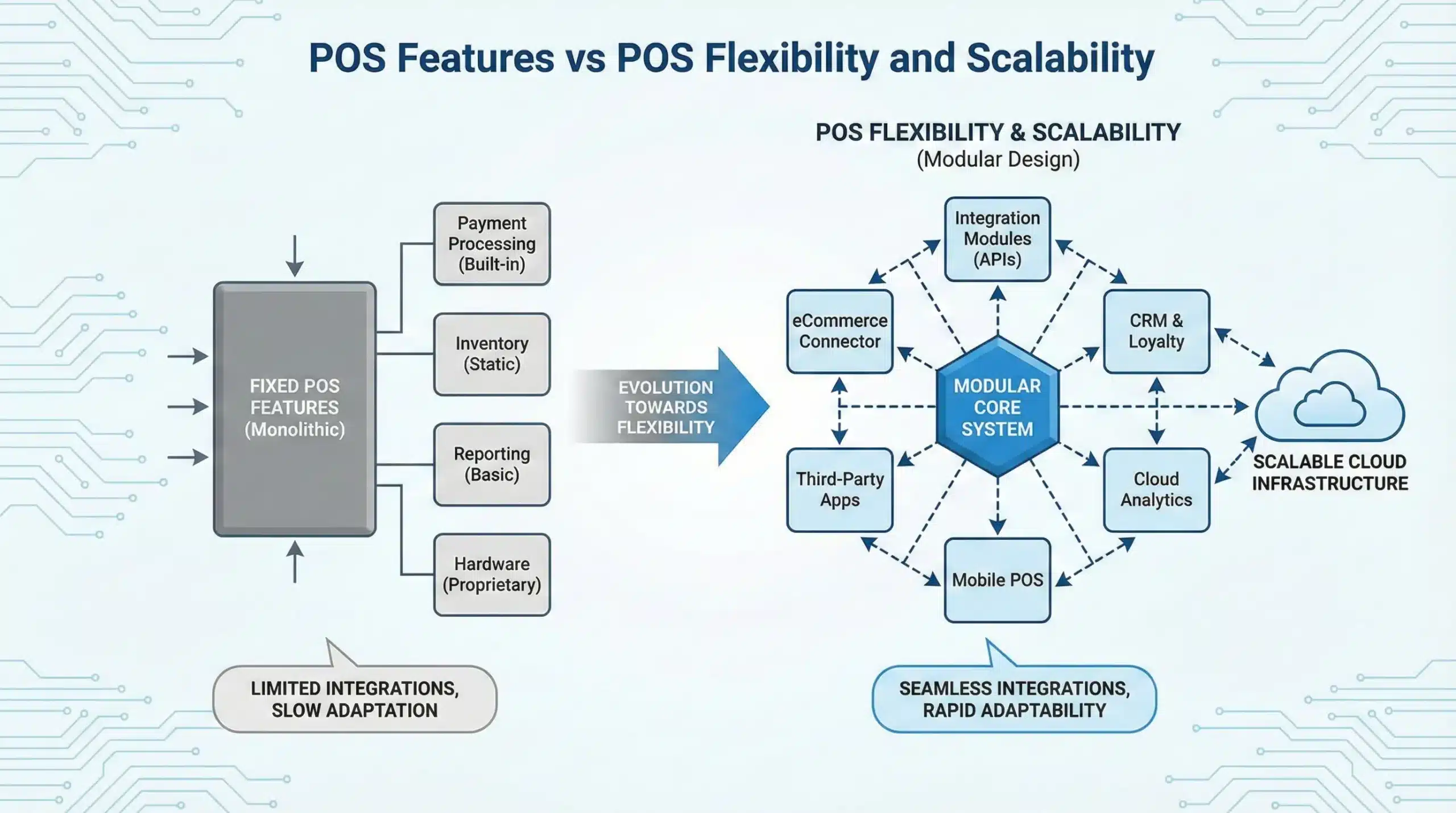
 How POS Flexibility Supports Change
 How POS Flexibility Supports Change
POS flexibility focuses on how easily a system adapts to different workflows, locations, and growth stages. Rather than adding more tools, flexible platforms emphasize customization and modular design.
Customizable POS Software for Unique Workflows
Customizable POS software allows businesses to tailor screens, permissions, and order flows. This flexibility reduces friction for staff and improves consistency across shifts.
For example, quick-service restaurants benefit from simplified order screens, while full-service venues require table management and coursing. A flexible system supports both without forcing compromises.
When workflows align with real operations, staff training becomes faster and errors decrease. Adaptable systems improve efficiency without adding complexity.
Modular POS Design and System Expansion
Modular POS design lets businesses activate only the tools they need. Instead of buying an all-inclusive platform, operators can add features as operations evolve.
This structure reduces unnecessary costs and keeps interfaces clean. Teams focus on relevant tools rather than navigating unused options.
As businesses expand, modular systems scale smoothly. New modules integrate without disrupting existing workflows or data.
POS Integrations and Open Connectivity
POS integrations connect payment systems with accounting software, loyalty platforms, and online ordering tools. These connections extend functionality without bloating the core system.
Some platforms restrict integrations through closed ecosystems. Others offer open APIs that allow custom connections.
Flexible integration options support automation and data flow across systems. This connectivity becomes increasingly important as businesses grow.
Features vs Adaptability in Daily Operations
The difference between rigid functionality and flexible design becomes most visible during daily operations. Real-world scenarios often expose system limitations.
Staff Efficiency and Speed of Service
POS interfaces directly affect how quickly staff can process orders. Fixed layouts may look polished but slow down experienced employees.
Customizable screens allow teams to optimize layouts for speed. Buttons appear where staff expect them, reducing mistakes.
Operational efficiency improves when systems adapt to staff behavior rather than forcing staff to adapt to software.
Managing Exceptions and Special Scenarios
Refunds, split payments, special pricing, and custom orders occur daily. Systems must handle these scenarios without friction.
Rigid rules often require manager overrides or manual adjustments. This slows service and increases error risk.
Flexible systems allow controlled exceptions while maintaining accountability. This balance supports smoother operations.
Consistency in Customer Experience
Customers expect fast, accurate service regardless of location or time of day. POS systems play a central role in meeting these expectations.
Adaptable workflows help staff respond to customer needs without confusion. Loyalty redemptions and order changes feel seamless.
Consistency improves when systems support real-world interactions rather than idealized processes.
POS Scalability and Long-Term Growth
Growth introduces complexity. POS scalability determines whether systems support expansion or become obstacles.
Supporting Multiple Locations and Menus
As businesses add locations, pricing, menus, and taxes vary by region. Scalable systems centralize control while allowing local customization.
Without flexibility, teams duplicate work and risk inconsistencies. Updates become time-consuming and error-prone.
Scalable POS platforms simplify expansion while preserving operational control.
Adapting to New Payment Technologies
Payment preferences evolve quickly. Contactless payments, mobile wallets, and alternative methods continue to gain adoption.
Scalable payment systems support new options without hardware replacements or retraining.
Businesses that adapt quickly stay competitive and meet customer expectations.
Data Growth and Advanced Reporting Needs
As transaction volume increases, reporting needs become more complex. Leaders require deeper insights.
Flexible analytics adapt to new KPIs and strategic goals. Static reports limit visibility.
Data-driven decisions depend on reporting systems that grow alongside the business.
How to Evaluate the Right POS Approach
Choosing the right POS system requires balancing features with adaptability. A structured evaluation prevents costly mistakes.
Assessing Current and Future Requirements
Businesses often overestimate immediate needs and underestimate future change. Feature-heavy systems may feel excessive early on.
Flexible platforms grow gradually without forcing upgrades. This approach protects budgets and reduces risk.
Future readiness should guide POS selection decisions.
Asking Vendors the Right Questions
Instead of asking what tools exist, ask how they adapt. Can workflows change? Are integrations open?
Vendor transparency reveals limitations early. Clear answers reduce long-term surprises.
Evaluation should focus on adaptability, not marketing claims.
Total Cost of Ownership Over Time
Initial pricing rarely reflects long-term costs. Customization fees, upgrades, and add-ons add up.
Flexible systems reduce dependency on paid support. Teams solve issues independently.
Long-term value depends on adaptability more than feature count.
Why Choose Biyo
 Why Choose Biyo
Biyo POS combines essential functionality with flexibility built for real operations. Its customizable POS software supports modular design, open integrations, and scalable payment systems.
Biyo adapts to changing workflows without locking businesses into rigid structures. To explore how Biyo fits your operation, you can schedule a call or sign up to get started.
Frequently Asked Questions
What is the difference between POS features and POS flexibility?
POS features describe what tools a system offers, while POS flexibility defines how easily those tools adapt to changing workflows and growth.
Why is flexibility important in a POS system?
Flexible systems support evolving menus, payment methods, and locations without requiring replacements or complex workarounds.
Can a POS system be both powerful and flexible?
Yes. The best platforms balance core functionality with customization, modular design, and open integrations.
How does POS scalability support growth?
Scalable systems allow businesses to expand locations, add payments, and improve reporting without disruption.
Is Biyo POS suitable for growing businesses?
Biyo POS supports growth through customizable workflows, modular features, and scalable payments designed for evolving operations.