If you're still using an old-school cash register, it's time for an upgrade. A modern pos system for small business is so much more than a glorified calculator; think of it as the command center for your entire operation, tying together your sales, inventory, and customer data into one neat package.
What a POS System Really Does for Your Business
So many small business owners are trapped in a cycle of manual work. You're stuck spending hours counting cash drawers, wrestling with inventory spreadsheets, and trying to recall what your best customers love to buy. All that admin work steals time you could be using to actually grow your business.
This is exactly where a point-of-sale (POS) system completely changes the game. It’s less like a cash register and more like a smartphone for your business. A simple calculator adds numbers. A smartphone, on the other hand, runs integrated apps that help you manage your entire life. A POS does the same thing, but for your business.
Beyond the "Cha-Ching"
That classic "cha-ching" sound means you made a sale, but that’s where an old register’s job ends. A modern POS system starts where that old tech stops, creating a powerful, connected ecosystem. It turns a single transaction into a goldmine of useful information that helps you make smarter business decisions.
It's this leap—from just ringing up sales to managing your entire business—that gives small businesses a real fighting chance. It puts all the tedious work on autopilot, freeing you up to focus on the big picture: strategy, customer relationships, and growth.
A POS system is the central nervous system of your business. It instantly links every sale to your stock levels, customer records, and financial reports, giving you a real-time view of your company's health.
The True Value for Small Businesses
For any small business, efficiency is everything. A good POS system automates the critical tasks that have a direct impact on your bottom line. You can stop guessing which products are your top sellers or when you need to reorder. The system just tells you.
Here’s what that looks like in the real world:
- Time Savings: It dramatically reduces manual data entry for sales and inventory. Some businesses have cut their admin time by as much as 30%.
- Informed Decisions: You can spot sales trends, pinpoint your busiest hours, and finally understand your customers' buying habits with just a few clicks.
- Improved Accuracy: Automated inventory tracking minimizes human error, which helps you avoid costly stockouts or overstocked shelves.
At the end of the day, a pos system for small business gives you the tools to not just survive, but to build a more profitable and resilient company. To really dive into the specifics, you can explore the full benefits of a POS system and see how they can transform your operation. From here, this guide will give you a clear roadmap to choosing, setting up, and getting the most out of a system built for you.
Understanding What a Modern POS System Actually Does
Think of it this way: a traditional cash register is like a basic calculator. It does one job, and it does it well. But a modern POS system for small businesses is more like a smartphone—it’s a central hub that connects dozens of "apps" to help you run your entire operation.
At its heart, any POS system is a team-up of hardware (the physical gear you can touch) and software (the digital brain that makes it all work). Together, they create a smooth process that kicks in the second a customer is ready to buy.
The Physical Components: POS Hardware
Every setup starts with the hardware. While you can customize it, most small businesses need a few key pieces to get up and running. These are the tools your team uses every single day.
Here’s the typical lineup:
- Terminal: This is your command center—the screen where you punch in orders and manage sales. It could be a dedicated touchscreen, an iPad, or even your phone.
- Card Reader: The device that lets you securely take payments from credit cards, debit cards, and mobile wallets like Apple Pay or Google Pay.
- Receipt Printer: Spits out paper receipts for customers. Of course, many systems today can email or text receipts, which is a nice, paper-saving touch.
- Barcode Scanner: A must-have for retail. It zaps barcodes to instantly pull up product info and pricing, making checkout a breeze.
- Cash Drawer: The secure box for your cash that pops open automatically when a cash sale is made.
The Digital Brain: POS Software
If the hardware is the body, the software is the brain. This is where the real magic happens. The software is what processes the payments, tracks all the data, and gives you the insights you need to make smarter business decisions.
It handles three core jobs that every business owner relies on.
A POS system isn't just about taking money. It's about understanding how your money is made. It connects every sale to inventory, customer history, and sales reports, giving you a live, accurate view of your business's performance.
First and foremost is payment processing. This is simply the system's ability to take money in all its forms. Whether someone wants to tap a card, use their phone, or pay with cash, the software handles the transaction, calculates the tax, applies any discounts, and closes out the sale.
Next up is sales reporting. Every time you ring someone up, the POS software logs it. All that data gets organized into easy-to-read reports that show you what’s selling, when your busiest hours are, and even how individual employees are performing. It turns a flood of transaction data into information you can actually use.
Finally, there's inventory management. When you sell a product, the software automatically subtracts it from your stock count. This is a game-changer for preventing stockouts, cutting down on manual counting errors, and knowing exactly what you have on hand at any given moment. This is essential for running a perpetual inventory system for real-time stock control, which keeps your numbers updated continuously.
For a closer look at how these pieces fit together, our guide on how does a POS system work breaks it down even further.
This kind of technology is becoming essential, especially for small businesses. A staggering 95% of small businesses bring in under $1 million a year, making an affordable, powerful POS a practical necessity. By 2025, it's expected that over 72% of retailers will be using cloud-based POS systems, which can boost revenue by an average of 9.5% for shops that connect their online and in-store operations.
The Features That Actually Help Your Small Business Grow
Once you get past the basic cha-ching of a sale, a modern POS system really starts to show its muscle. It stops being just a cash register and becomes the command center for your entire business. The right features don't just process payments; they actively work to grow your sales, save you precious time, and help you build real relationships with your customers.
Think of it like this: a basic cash box just holds money. A modern POS is like having a super-smart assistant who tracks everything, remembers every customer, and gives you a daily briefing on what's working and what's not. These features are the tools that solve your biggest headaches and unlock new ways to thrive.
Getting a Handle on Your Inventory
One of the biggest game-changers is real inventory management. This is way more than just a simple count of what's on the shelf. It’s about building an intelligent system that practically runs itself, preventing you from making expensive mistakes.
Imagine never having to guess when to reorder your best-selling coffee beans again. A smart POS can be set up to send you automatic low-stock alerts the moment your supply dips below a certain level. That single alert can be the difference between a happy regular and a lost sale because you unexpectedly ran out.
From there, the system can help you create and send purchase orders straight to your suppliers. When the new stock arrives, you scan it in, and your inventory levels update instantly. This creates a seamless loop that cuts down on human error and gives you a perfect, up-to-the-minute picture of what you actually have.
Building Real Customer Relationships
Your customers are everything, and a POS with built-in Customer Relationship Management (CRM) tools helps you treat them that way. A CRM feature turns every anonymous transaction into a chance to build a connection.
On a basic level, it lets you build a customer database. You can save their contact info, see what they've bought in the past, and even add little notes about their preferences. For instance, a coffee shop barista could make a note that a customer always asks for oat milk, allowing for a more personal touch on their next visit.
A POS with a built-in CRM is like giving your business a perfect memory. It remembers every customer and every purchase, letting you build genuine loyalty and make everyone feel like a regular.
This data is gold for your marketing. You can easily set up a loyalty program that rewards repeat business with points or special discounts, giving people a great reason to come back. When you consider that boosting customer retention by just 5% can increase profits by 25% to 95%, you can see why these tools are so powerful.
Managing Your Team and Their Performance
Your team is your biggest asset, and a good POS helps you manage them more effectively. With employee management features, you can create separate accounts for each staff member with custom permissions. This keeps your data secure and makes everyone accountable.
More importantly, it gives you tools to track performance. You can see sales data for each employee, which is perfect for spotting your top performers or figuring out who might need a bit more training. The system often doubles as a time clock, too, so staff can clock in and out right on the terminal. This makes payroll a breeze and ensures you're tracking hours accurately.
Before we dive into the most powerful feature—analytics—let's look at how these core features directly benefit different types of small businesses.
Essential POS Features for Small Business Success
This table breaks down how some of the most crucial POS features serve the unique needs of retail shops versus restaurants or cafes. While many features are useful for everyone, their application can be quite different.
| Feature | Benefit for Retail Shops | Benefit for Restaurants/Cafes |
|---|---|---|
| Inventory Management | Tracks stock of individual SKUs (e.g., shirt sizes/colors). Prevents stockouts of popular items and helps manage seasonal merchandise. | Tracks ingredient-level inventory (e.g., buns, patties, cheese). Reduces food waste and ensures you never run out of a key dish component. |
| Customer Relationship Management (CRM) | Builds profiles to track purchase history, enabling targeted promotions for specific clothing brands or product categories. | Remembers a customer's favorite table, dietary restrictions, or go-to coffee order, creating a highly personalized dining experience. |
| Loyalty Programs | Offers points per dollar spent, redeemable for discounts on future purchases. Encourages repeat visits and larger basket sizes. | Provides a "buy 10, get one free" coffee card digitally or offers exclusive access to new menu items for loyal members. |
| Employee Management | Tracks sales per employee to identify top sellers for commission or bonuses. Restricts access to sensitive functions like issuing refunds. | Manages server sections, tracks tips, and allows staff to clock in/out easily. Assigns different permissions for hosts, servers, and managers. |
As you can see, the right features are tailored to solve the specific, day-to-day challenges of your industry, turning your POS into a truly indispensable tool.
Reports and Analytics That Tell You What to Do Next
This is where everything comes together. While basic sales totals are nice to know, a powerful POS digs deeper to give you clear insights that can guide your entire business strategy. It gathers all the data—what sold, when it sold, who sold it—and presents it in reports that are actually easy to understand.
This information helps you spot sales trends, pinpoint your most profitable products, and figure out your busiest times of day. With that knowledge, you can make smarter decisions about everything from staff scheduling to marketing campaigns.
A Real-World Example: A Local Boutique
Let's imagine a small clothing boutique using the analytics from its POS. The owner pulls a report and sees two things: a particular brand of denim jeans is flying off the shelves, especially on Saturdays, and customers who buy those jeans often grab a specific style of t-shirt at the same time.
Armed with this data, the owner can take immediate action:
- Fine-Tune the Inventory: They can increase the next order of those popular jeans to make sure they don't sell out on the busiest day of the week.
- Create a Smart Promotion: They can launch a "Saturday Style" deal, offering 15% off the popular t-shirts with the purchase of any pair of the best-selling jeans.
- Improve the Store Layout: They can move the display of those t-shirts right next to the jeans to make the bundle purchase even more tempting.
This is how a pos system for small business goes from being an expense to a profit-driver. It gives you the intelligence to stop guessing and start making data-backed decisions that directly lead to growth.
How to Choose the Right POS System for Your Business
Picking the right pos system for small business can feel like a mountain of a task, but it really doesn't have to be. Think of it like buying a new car. You wouldn't just pick the first one on the lot; you'd think about gas mileage, cargo space, safety features, and whether it fits your family's lifestyle. The same thinking applies here—the goal is to find a system that slots perfectly into your business workflow, budget, and where you plan to be in a few years.
If you break the decision down into a few manageable steps, what seems complex becomes a clear path forward. By starting with your own unique needs, you can cut through the marketing noise and find a solution that will actually help you grow, not just be another gadget on your counter.
First, Assess Your Business Needs
Before you even start looking at brands or feature lists, the single most important step is to get a crystal-clear picture of what you actually need. A system that’s a dream for a bustling coffee shop will be a clunky nightmare for a retail boutique.
Start by thinking about your industry and what a typical day looks like.
-
For Retail Shops: Your world revolves around inventory. You need a system that can juggle thousands of SKUs, track product variants like size and color, and make managing purchase orders feel effortless. A built-in barcode scanner is absolutely essential.
-
For Restaurants and Cafes: You're all about service and speed. Look for features like table management, easy order modifiers (for all those "no onions" requests), and the ability to split bills without a headache. A kitchen display system (KDS) integration is often a game-changer for connecting your front-of-house staff with the kitchen.
-
For Service-Based Businesses: Your needs are totally different. You'll likely want to prioritize things like appointment scheduling, keeping detailed client histories, and being able to sell service packages or handle recurring billing.
Once you’ve sorted out your industry-specific software needs, think about the hardware. Do you need a tough, all-in-one terminal for a busy checkout counter? Or would a flexible, tablet-based system be better for moving around the store or taking orders right at the table? The physical setup should support the way you already work, not force you to change your entire process.
Compare Software: On-Premise vs. Cloud-Based
Next up, you have a big decision to make about the software model. This choice will affect everything from your initial investment to how and where you can access your business data.
On-premise systems are the old-school approach. You buy the software license outright and install it on a local server right there in your business. This usually means a much higher cost upfront, and you're on the hook for maintaining the hardware and keeping your data secure.
Cloud-based systems, often called SaaS (Software as a Service), are what most businesses use now. You pay a monthly subscription fee, and the software runs on the provider's super-secure servers. This gives you a lower upfront cost, automatic software updates, and the freedom to check in on your business from anywhere with an internet connection.
For the vast majority of small businesses, a cloud-based pos system for small business is the hands-down winner. It's more affordable to get started, far more flexible, and lets the provider handle all the technical heavy lifting so you can focus on your business.
Decode the Pricing Models
Understanding how you'll be charged is critical to avoiding nasty surprises on your monthly statement. POS costs are usually a mix of three things: software fees, hardware costs, and payment processing rates. Those processing fees, in particular, can be tricky.
Here’s a quick look at the most common pricing models:
- Monthly Subscriptions: This is a straightforward, fixed fee you pay each month to use the POS software, which is how Biyo POS works. It’s predictable and makes budgeting a breeze.
- Flat-Rate Processing: You pay a single, fixed percentage for every transaction (for example, 2.6% + 10¢). This model is wonderfully simple and transparent, making it a great fit for most small businesses.
- Interchange-Plus Pricing: This is a more complex model where you pay the base interchange fee (set by card networks like Visa) plus a small, fixed markup from your processor. It can be cheaper for businesses with very high sales volume but is often less predictable from month to month.
Always ask for a complete breakdown of every potential fee—setup, hardware, and any extra charges for add-on features or customer support. A good decision isn't just about cool features; it's about finding a system that delivers real value. In fact, businesses that adopt systems with integrated analytics, loyalty programs, and smart inventory tools often see a 5% to 10% increase in their profit margins, while their transaction times can drop by up to 30%.
Don't Forget Scalability and Support
Finally, remember that you’re choosing a partner, not just a product. Your business is going to grow, and your POS system has to be able to keep up. Can you easily add new registers, open another location, or plug in an e-commerce integration when the time comes? A scalable system saves you the massive headache of having to switch platforms in a few years.
Just as important is customer support. What happens if your system goes down during your Saturday lunch rush? Before you sign anything, ask some tough questions. A great place to start is our top POS system comparison for 2025, which can help you think through these critical factors.
Here are a few questions you should absolutely ask any provider you're considering:
- What are your customer support hours? Are you available 24/7?
- Do you offer support over the phone, email, and live chat?
- What’s your typical response time for an urgent issue?
- Is support included in my plan, or is it an extra cost?
Reliable, easy-to-reach support is a safety net you can't afford to skip. It’s what ensures a small technical glitch doesn’t spiral into a business-halting disaster.
So, you’ve picked out your new point of sale system. Now what? Getting it up and running might feel like a huge task, but it’s more manageable than you think. By breaking it down into a few key steps, you can go from unboxing the hardware to ringing up your first sale without a hitch.
Think of it as a one-week project, not something you need to accomplish overnight. A little planning goes a long way in making sure your team is confident, your data is accurate, and your customers barely notice the change.
Step 1: Setting Up the Hardware and Software
First things first, let's get the physical gear in place. Find the perfect spot on your counter for the terminal, then plug in your card reader, receipt printer, and barcode scanner. A few minutes spent tucking cables away now will save you from a tangled mess later.
Once everything is powered on, it's time to install the POS software. This is where you’ll configure the basics—adding your business name and address, setting up local tax rates, and customizing what appears on your receipts. Getting these details right from the start prevents a lot of future headaches.
Step 2: Getting Your Products into the System
With the technical side handled, it’s time to fill your system with everything you sell. Thankfully, you don't have to type in hundreds of items one by one. Most modern systems, like Biyo POS, let you upload your entire inventory from a simple spreadsheet. It’s a massive time-saver.
For every product, you'll need to include a few key details:
- Product Name: Something clear and easy to identify.
- Price: What the customer pays.
- SKU or Barcode Number: Essential for quick scanning and inventory tracking.
- Stock Quantity: How many you currently have on hand.
This step turns your empty POS into a fully functional digital catalog, ready to go.
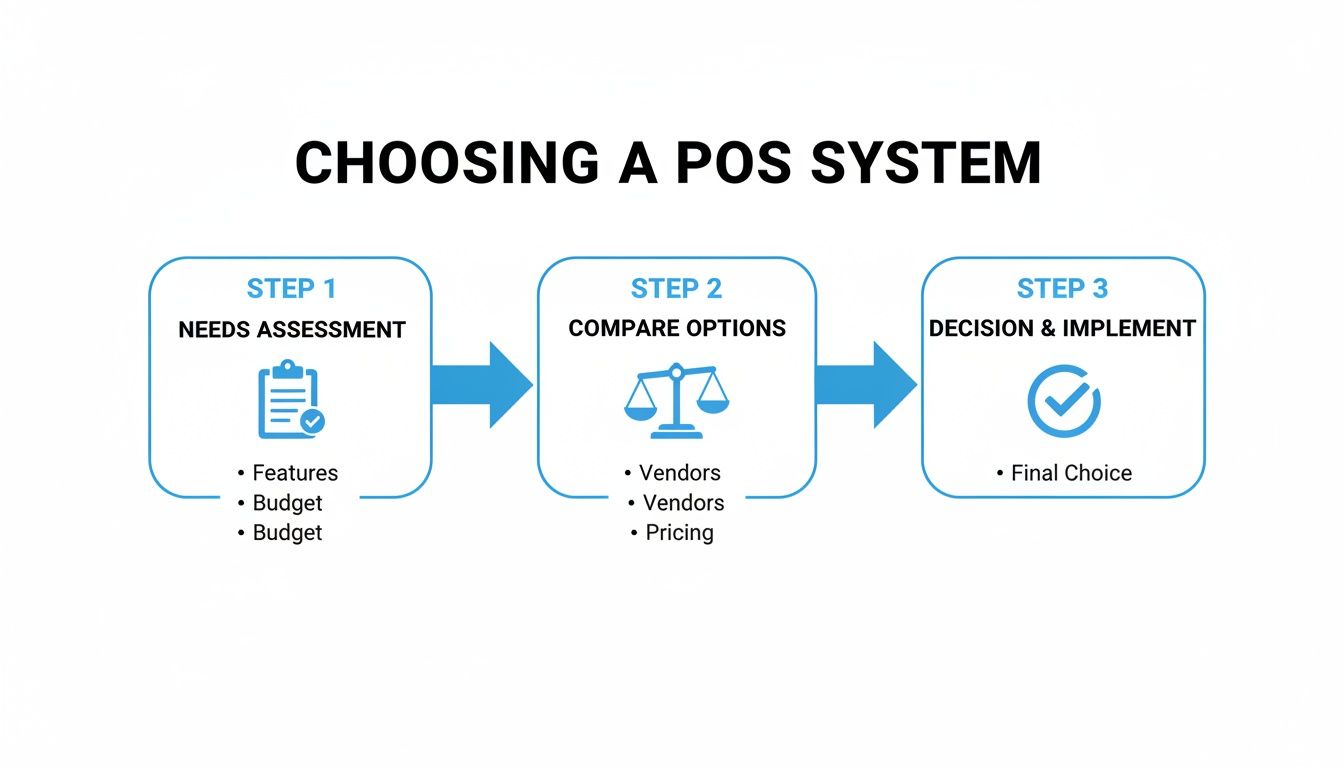
The flowchart below gives you a bird's-eye view of the selection process, from figuring out what you need to making that final call.
As you can see, it all starts with a solid understanding of your business's unique needs before you even start looking at different solutions.
Step 3: Training Your Team and Running Tests
A new system is only as good as the people who use it every day. Find a quiet time to schedule a couple of training sessions with your staff. Walk them through the essentials: how to process a sale, handle a refund, and apply discounts.
Before you go live, running a few test transactions is non-negotiable. Seriously. Ring up a fake cash sale, a card payment, and a refund to make sure every component is working exactly as it should.
You might also want to try a "soft launch." For a day or two, run your new POS alongside your old system. This gives your team a safety net to build confidence without the pressure of a hard switch. It's worth the effort—modern POS systems have been shown to reduce transaction times by 25–30%. You can learn more about recent retail POS trends and see just how much they can boost efficiency.
A Realistic One-Week Rollout Plan
To put it all together, here’s what a typical implementation week could look like. Feel free to adjust it to fit your own schedule.
| Day | Task | Goal |
|---|---|---|
| Mon | Unbox & Set Up Hardware | Get all the physical pieces connected and powered up. |
| Tue | Configure Software & Upload Inventory | Your complete product catalog is loaded into the system. |
| Wed | Staff Training Session 1 | The team learns the basics of ringing up a sale. |
| Thu | Staff Training Session 2 & Testing | Practice refunds and special cases; run test transactions. |
| Fri | Soft Launch | Run old and new systems together for a seamless transition. |
| Sat | Go Live! | Make the full switch to your new POS for all transactions. |
Maximizing Your Return on Investment After Setup
Getting your new pos system for small business up and running is a huge first step, but it’s really just the beginning. The real magic happens when you stop seeing it as a cash register and start treating it like the nerve center of your business. After the initial setup, your goal should be to constantly fine-tune how you use it to bring in more money, trim costs, and make your daily operations run smoother.
Think of the data your POS collects as a storybook about your business. Every single sale, customer profile, and inventory count is a page in that book. When you learn to read it, you can make smarter decisions that directly boost your bottom line, ensuring your investment pays for itself over and over again.
Use Sales Data to Refine Your Strategy
Your sales reports are an absolute goldmine of information, and they tell you so much more than just how much you made today. They reveal the hidden patterns of your business—the what, when, and why behind every purchase. Make it a habit to regularly check in on your top-selling products and your busiest times of day.
Imagine you run a small café. After looking at your sales data, you notice a clear trend: a specific croissant is almost always bought with a latte between 8 AM and 10 AM. Boom. You’ve just discovered a perfect opportunity for a "Morning Rush" combo deal. This isn't just guesswork; it's a smart, data-backed move to create an offer you know your customers will love.
This same approach works wonders for managing your stock. By pinpointing items that are just gathering dust on the shelves, you can stop reordering products that tie up your cash and take up precious space. To make the most of this, it's smart to think about the initial cost from day one by understanding equipment financing options that can make a powerful system more affordable.
Drive Repeat Business with Customer Insights
It’s a well-known fact in business: keeping a loyal customer is way cheaper than finding a new one. Your POS system’s customer relationship management (CRM) features are your secret weapon for building that loyalty and keeping people coming back.
A POS system transforms anonymous transactions into valuable customer relationships. Use purchase history to personalize marketing, create targeted promotions, and make every customer feel like a regular.
Here are a few practical ways to put that customer data to work:
- Implement a Loyalty Program: This is a classic for a reason. Reward your regulars with points, discounts, or special freebies. A good POS tracks all of this automatically, making it completely seamless for you and your customers.
- Create Targeted Promotions: See a customer who hasn't stopped by in a while? Send them a quick "we miss you" offer to draw them back in. You can also group customers by their favorite purchases and let them know when a related new item is in stock.
- Improve Staffing Efficiency: Your employee performance reports can show you who your sales superstars are. Schedule them during your busiest shifts to make sure your A-team is on the floor when it counts the most, maximizing every sales opportunity.
A Few Final Questions About POS Systems
Choosing the right POS system for small business usually brings up a few last-minute questions. Let's tackle the most common ones so you can feel confident in your decision.
What's the Real Cost of a POS System for a Small Business?
This is the big one, and the honest answer is: it depends. POS system costs can really swing based on what you need. For the software itself, you're typically looking at a subscription fee anywhere from $29 to $79 per month for each register or terminal.
Then there's the hardware. You might get by with just a tablet and a card reader for a few hundred dollars. But if you need a full setup with multiple terminals, cash drawers, and receipt printers for a busy shop, that investment could climb into the thousands.
A classic mistake is getting fixated on the low monthly software price. You have to look at the whole picture: payment processing fees, hardware costs, and any extra charges for add-ons. That's how you find the true cost.
Always push for a crystal-clear breakdown of payment processing fees—these are ongoing and will have a big impact on your bottom line. Look for providers who offer straightforward pricing without sneaky setup charges or penalties for leaving early.
Can I Connect a POS System to the Other Tools I Already Use?
Absolutely. In fact, this is one of the best things about modern cloud-based POS systems. They're built to play nicely with the other software that runs your business.
Think about it: when you connect your POS to an e-commerce platform like WooCommerce, your online and in-store inventory sync up automatically. That means you'll never have to apologize to an online customer for selling them an item that just sold out in your physical store.
It's the same story with accounting software. Hooking it up to your POS can automate hours of tedious data entry and cut down on human error. Before you sign on the dotted line, just make sure to double-check the POS provider's list of integrations to see if your must-have tools are on it.
Ready to see how a powerful, all-in-one POS system for small business can pull everything together for you? Discover how Biyo POS can simplify your sales, inventory, and customer relationships. Get started with a free trial today!