
Learning how to connect kiosks to kitchen screens is the vital missing link in modern fast-casual restaurant automation. Over the past several years, restaurant operators have rapidly deployed self-ordering touchscreen kiosks to eliminate front-counter queues. In addition, kiosks consistently increase average order value by twenty percent through automated visual upselling. However, accelerating order intake at the front door without upgrading back-of-house communication creates a severe operational bottleneck.
When self-service kiosks operate without real-time kitchen integration, the front-counter choke point simply shifts twenty feet deeper into your restaurant. Kiosks can easily accept five complex customized orders per minute during peak rushes. If those orders print as uncoordinated paper tickets on a single kitchen rail, line cooks quickly become overwhelmed. Even worse, once the food is prepared, staff must shout order numbers across a crowded dining room, creating acoustic chaos and frustrating waiting guests.
Fortunately, modern cloud point-of-sale architecture allows operators to synchronize customer touchscreens directly with kitchen production lines and customer-facing status boards. By building a unified data loop between kiosks, multi-station kitchen display systems (KDS), and digital pickup displays, you eliminate counter crowding permanently. In addition, your expeditor station transforms into an organized, high-velocity fulfillment hub. This comprehensive guide details the technical workflows, hardware architecture, and operational blueprints required to connect kiosks to kitchen screens seamlessly.
Table of Contents
- The Kiosk-to-Counter Choke Point in Fast-Casual Dining
- Architectural Foundations: How Kiosks Route Data to Kitchen Screens
- The Role of the Master Expediter Screen in Order Assembly
- Customer-Facing Status Displays: Visual ‘Now Preparing’ Architecture
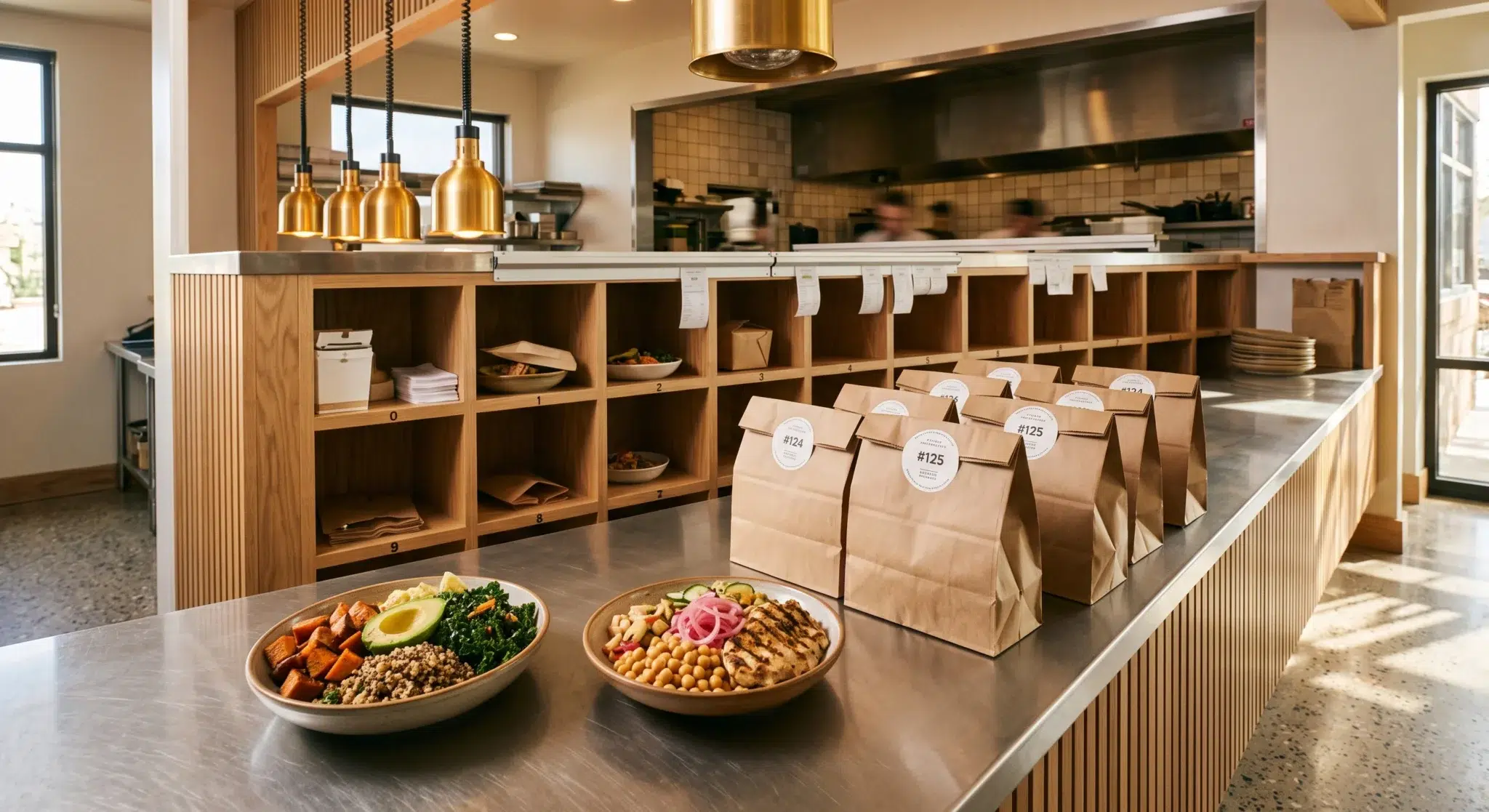
- Physical Staging Zones: Organizing Numbered Shelves and Handoff Cubbies
- Side-by-Side Comparison
- How Biyo POS Closes the Kiosk-to-Kitchen Synchronization Loop
- Frequently Asked Questions
The Kiosk-to-Counter Choke Point in Fast-Casual Dining
Deploying self-service kiosks accelerates customer throughput dramatically at the ordering stage. However, unmanaged order acceleration frequently overwhelms traditional kitchen assembly lines. When front-of-house intake velocity exceeds back-of-house fulfillment capacity, your dining room experiences a complete operational breakdown.
Consequently, guests who enjoyed a fast ordering experience on a touchscreen find themselves waiting in a chaotic, disorganized crowd at the pickup counter. Understanding how this choke point develops allows operators to implement synchronized digital solutions.
The Paradox of Rapid Order Intake vs. Pickup Counter Clutter
In a traditional cashier-operated restaurant, the physical cashier acts as a natural throttle on kitchen production. A cashier takes roughly ninety seconds to greet a customer, enter items, and process payment. This natural delay spaces out incoming tickets, allowing line cooks to pace food preparation evenly.
When you install three self-service kiosks, that artificial throttle disappears. Three customers can build, customize, and pay for large orders simultaneously in under sixty seconds. Consequently, fifteen entrees hit the kitchen rail within two minutes. If your kitchen relies on paper chits, tickets pile up on the expeditor rail, leading to delayed cook times and cold food. Meanwhile, dozens of customers congregate directly around the pickup counter, blocking incoming diners and creating severe lobby gridlock.
The Broken Auditory Handoff: Shouted Numbers and Guest Friction
Once an order is finally plated and bagged, traditional restaurants rely on auditory notifications to complete the transaction. An expeditor or cashier leans over the pass and shouts, “Order number 48!” into a loud dining room.
This auditory handoff mechanism is deeply flawed in modern hospitality:
- Acoustic Noise Pollution: Shouted order numbers compete with background music, espresso grinders, and customer conversations, ruining dining room ambiance.
- Missed Calls and Cold Bags: Guests wearing headphones or seated across the room fail to hear their number, leaving hot food to sit under heat lamps for ten minutes.
- Wrong Order Snatching: Impatient customers frequently grab the wrong bag from the counter, taking another diner’s customized meal and forcing expensive kitchen remakes.
 Architectural Foundations: How Kiosks Route Data to Kitchen Screens
 Architectural Foundations: How Kiosks Route Data to Kitchen Screens
To eliminate order handoff friction, restaurant operators must establish direct digital communication pathways between ordering hardware and kitchen stations. Relying on separate software plugins or third-party middleware introduces latency and synchronization errors.
Instead, a unified cloud POS platform establishes persistent WebSocket connections that transmit order payloads instantaneously. Understanding this digital architecture is essential when you connect kiosks to kitchen screens.
WebSocket Telemetry and Sub-Second Ticket Splitting
When a customer finalizes payment at a self-service kiosk, the terminal compiles the transaction into a structured JSON data payload. Rather than sending this data through slow polling cycles, modern systems broadcast the payload across local WebSockets in under 500 milliseconds:
- Instant Order Parsing: The POS cloud database parses the order items, modifiers, customer identifiers, and dietary notes immediately upon payment authorization.
- Multi-Station Ticket Splitting: The system splits complex tickets automatically across specialized kitchen display screens based on predefined category routing rules.
- Sub-Station Routing: The grill station KDS receives only burger patties and cooking temperatures, the fryer station receives side orders, and the pantry station receives salads and cold appetizers.
- Master Expo Synchronization: Simultaneously, the master expeditor display populates the complete, consolidated order ticket, tracking the preparation state of every individual item in real time.
Generating Unified Order Numbers Across Walk-In, Kiosk, and Web Channels
A common challenge in multi-channel restaurants is duplicate order numbering. If your cashier register generates Order #12, your self-service kiosk generates Order #12, and your web ordering portal also generates Order #12, the kitchen expeditor faces total confusion during fulfillment.
To prevent this collision, cloud point-of-sale platforms utilize a centralized, global sequence generator. Every order across all channels—whether placed at a kiosk, counter register, online web store, or third-party delivery app—receives a distinct, synchronized sequential number. Alternatively, kiosks can assign two-digit visual sequence codes (e.g., K-01 through K-99) that immediately identify the ticket’s origin to kitchen staff.
The Role of the Master Expediter Screen in Order Assembly
In a high-volume commercial kitchen, the expeditor station serves as the command center for quality control and packaging. The expeditor ensures that hot items, cold sides, and beverages unite at the pass simultaneously before reaching the guest.
Replacing paper ticket rails with a digital Master Expediter Screen streamlines this assembly process and triggers automated customer handoff alerts.
Multi-Station Aggregation: Uniting Grill, Fry, and Cold Line Preps
When line cooks work across multiple prep stations, coordinating completion times is difficult. A burger might finish cooking on the grill four minutes before the fryer station drops the accompanying french fries. Consequently, the burger sits cooling on the counter while waiting for the side dish.
A Master KDS screen solves this timing mismatch through visual status tracking:
- Individual Item Check-Offs: When the grill cook finishes the burger and taps the item on their screen, the item turns green on the master expo display.
- Station Readiness Indicators: The expeditor sees at a glance which sub-stations have completed their components and which stations are still actively prepping.
- Coordinated Plating Calls: The expeditor can pace cooking calls verbally or digitally, ensuring that delicate fried items and hot entrees land on the packaging pass at the exact same moment.
One-Tap Bump Logic: Triggering Automated Status Changes
The physical action of completing an order must be effortless for kitchen staff. When the expeditor finishes assembling all items into a bag or dining tray, they tap the ticket on the touch-enabled expo screen or press the corresponding button on a physical bump bar.
This single “bump” action initiates a cascade of automated operational events:
- Ticket Archival: The order is cleared from active preparation queues, updating average kitchen fulfillment metrics in the POS reporting dashboard.
- Expo Label Printing: A compact thermal label printer beside the pass instantly prints an adhesive bag tag displaying the customer name, order number, and item checklist.
- Status Board Broadcast: The system sends an instant WebSocket signal to the customer-facing pickup display, moving the order from the “Preparing” column to the “Ready for Pickup” column.
Customer-Facing Status Displays: Visual ‘Now Preparing’ Architecture
The most effective way to eliminate crowd congestion at your service counter is providing total visual transparency. When guests know the exact status of their food, they have no reason to crowd the pickup counter.
Deploying a commercial Customer Pickup Display (CPD) in your dining lobby creates a calm, organized waiting environment that keeps customers informed.
The Dual-Column Layout: Visual Clarity for ‘Preparing’ vs. ‘Ready’
A standard customer status board utilizes a high-contrast, dual-column digital layout mounted prominently in the dining room or pickup lounge:
- Left Column (‘Now Preparing’ / Yellow Header): Displays all active orders currently being cooked in the kitchen. When a customer finishes ordering at a kiosk, their order number appears here within one second. Seeing their number on the board confirms that the kitchen received their order.
- Right Column (‘Ready for Pickup’ / Vibrant Green Header): When the expeditor bumps the completed ticket, the order number shifts smoothly from the left column to the right column. The number flashes with a soft visual pulse, accompanied by a gentle auditory chime.
- Completed Order Clear Time: Once an order is collected by the customer, the number remains visible in the ‘Ready’ column for a configurable duration (e.g., three minutes) before clearing automatically.
Reducing Customer Anxiety and Counter Loitering with Dynamic ETAs
Customer anxiety increases when guests are forced to wait in total silence without status updates. When diners cannot see what is happening behind the kitchen wall, they naturally drift toward the counter to ask staff for updates.
By providing a clear visual status board, you manage customer expectations effortlessly:
- The customer completes their transaction at the self-service kiosk and receives a printed receipt showing Order #34.
- The guest glances up, spots Order #34 in the “Now Preparing” column, and proceeds comfortably to a dining table or waiting seat.
- Because the guest knows their order is actively being prepped, they do not hover around the packaging pass or distract busy kitchen expeditors.
- When Order #34 moves to “Ready for Pickup,” the customer walks directly to the pickup zone, grabs their order, and departs.
Physical Staging Zones: Organizing Numbered Shelves and Handoff Cubbies
Digital synchronization must connect cleanly with physical lobby architecture. If your status board directs guests to collect their food, but your counter remains an unorganized pile of identical paper bags, handoff delays will still occur.
Designing a structured, numbered staging zone completes your automated fulfillment pipeline and enables frictionless grab-and-go pickups.
Last-Two-Digit Staging Shelves and High-Density Cubby Systems
Organizing physical pickup shelves eliminates the need for staff to manually hand bags to customers. Implementing a structured numbering taxonomy ensures rapid order retrieval:
- Decade-Numbered Shelving Racks: Install a clean wooden or stainless steel shelving unit featuring ten labeled cubbies numbered 0 through 9. Expeditors place completed bags onto the shelf matching the last digit of the order ID (e.g., Order #47 goes to Shelf 7).
- Illuminated Digital Cubbies: Advanced fast-casual concepts utilize automated pickup lockers that light up in green when an order is ready, unlocking only when the customer scans their receipt barcode.
- Clear Visual Signage: Position overhead signage directing customers to match their receipt number with the corresponding shelf slot for immediate self-service collection.
Silent Handoff Protocols: Connecting Kiosk Tickets to Staged Bags
Combining digital status screens with numbered staging shelves enables true “silent handoffs.” Front-of-house staff never need to shout names or verify receipts manually:
- The expeditor seals the bag with a tamper-evident adhesive label containing the large printed order number (e.g., #34).
- The expeditor places the bag onto Shelf 4 and bumps the KDS screen.
- The Customer Pickup Display flashes “Order #34 – Ready on Shelf 4.”
- The customer walks directly to Shelf 4, verifies the printed label, collects their bag, and exits the restaurant in under five seconds.
Side-by-Side Comparison
| Operational Dimension | Unsynchronized Kiosks & Paper Tickets | Unified KDS & Customer Status Loop (Biyo POS) |
|---|---|---|
| Order Routing Speed | Slow (Batched thermal printouts on single rail) | Sub-second WebSocket injection across all prep screens |
| Kitchen Station Coordination | Manual shouting between cooks; cold sides sit | Master Expo screen aggregates sub-station readiness |
| Handoff Communication | Staff shouting order numbers over loud dining room | Silent dual-column ‘Preparing / Ready’ status boards |
| Lobby Congestion | Severe counter crowding; guests blocking entrances | Calm waiting lounge; guests seated until number flashes |
| Wrong Order Pickups | Frequent (Impatient guests grab incorrect bags) | Eliminated (Numbered staging shelves & adhesive tags) |
| FOH Labor Allocation | 1–2 staff dedicated to calling orders and handing bags | Staff reallocated to food prep and dining hospitality |
| Hardware Maintenance | Constantly clearing paper jams and replacing ribbons | Clean, paperless digital screens running in Chrome |
| Guest Satisfaction Score | Low (Stressful, loud, and disorganized waiting) | High (Transparent, fast, and modern self-service) |
How Biyo POS Closes the Kiosk-to-Kitchen Synchronization Loop
Biyo POS delivers a specialized cloud point-of-sale and kitchen management platform engineered to solve the complex operational challenges of modern high-volume restaurants. Operating natively inside the Google Chrome browser on any PC, Mac, iPad, or Android tablet, Biyo provides complete restaurant automation without forcing operators into expensive proprietary hardware contracts.
When you connect kiosks to kitchen screens using Biyo, you unlock a seamless, closed-loop ordering ecosystem. Orders placed on customer-facing Biyo Kiosks route instantly over local WebSockets to the Biyo Kitchen Display (KDS) app available on Google Play. The platform automatically splits complex modifier trees across specialized prep lines while consolidating full tickets on the Master Expediter screen. With Biyo’s 1-tap bump logic, expeditors update kitchen fulfillment metrics and trigger customer handoff alerts simultaneously.
Furthermore, Biyo includes native support for digital Customer Pickup Displays. Mount any low-cost commercial television or monitor in your lobby, connect it to Biyo, and display dynamic “Now Preparing” and “Now Ready” status columns updated in real time with zero third-party software subscriptions. Front-of-house teams can audit retail inventory using the Biyo Inventory Scanner app on the Apple App Store, consolidate third-party delivery orders via Kitchen Hub, and maintain continuous ordering during network drops with Biyo’s true offline transaction mode.
To discover how easily your restaurant can eliminate lobby congestion, connect self-service kiosks to kitchen screens, and streamline customer pickups, you can schedule a live demo with a restaurant systems specialist or get started today on the Biyo signup page.
Frequently Asked Questions
Why should restaurants connect kiosks to kitchen screens?
When you connect kiosks to kitchen screens, you eliminate the delay and errors of paper kitchen tickets, automate multi-station prep routing, and provide real-time order tracking that prevents counter crowding during peak rushes.
How do customer-facing pickup displays work with a KDS?
Customer pickup displays connect to the kitchen display system via cloud WebSockets. When a customer orders at a kiosk, their number appears under “Now Preparing.” When the expeditor bumps the completed ticket on the KDS, the number instantly moves to “Now Ready.”
What hardware is required to display customer order status screens?
You can run a customer order status screen using any standard commercial television, computer monitor, or tablet equipped with an HDMI input or web browser, connected directly to your cloud POS platform without expensive proprietary media players.
How does multi-station ticket splitting work for kiosk orders?
The cloud POS parses incoming kiosk orders and routes individual line items to specific station screens—such as sending burgers to the Grill KDS and fries to the Fryer KDS—while displaying the consolidated order on the Master Expediter screen.
Can customer status boards reduce front-of-house labor costs?
Yes. Visual status boards automate order readiness notifications, eliminating the need for dedicated staff to shout numbers, manage waiting crowds, or manually hand bags across the counter.
Does Biyo POS require third-party plugins to sync kiosks with kitchen displays?
No. Biyo POS features a fully native unified loop connecting customer kiosks, the Biyo KDS app on Google Play, and customer pickup status displays directly without requiring paid third-party middleware or complex API integrations.