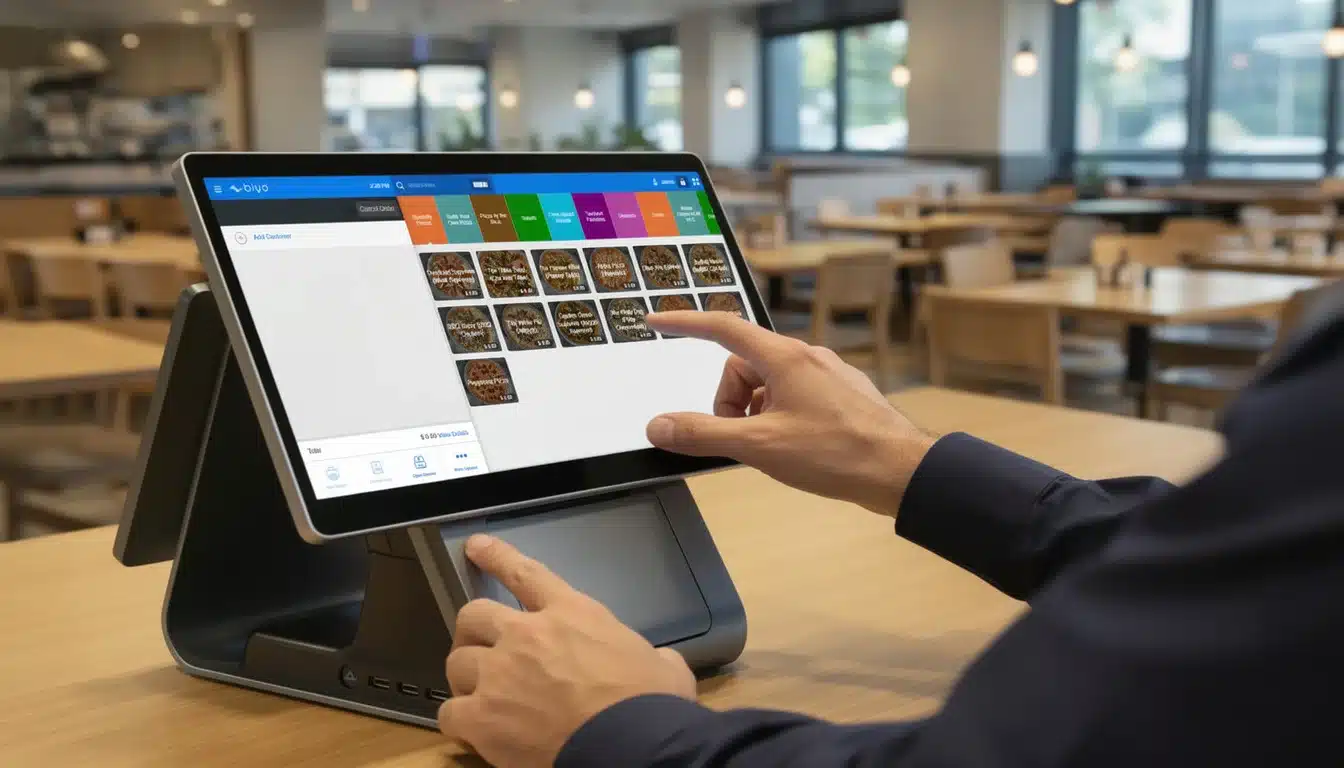
In today’s fast-paced restaurant industry, managing menus across multiple platforms and locations can be a daunting challenge. That’s where Menu Synchronization Tools come into play, revolutionizing how restaurants update, control, and unify their menu offerings. These tools enable businesses to maintain pricing consistency, implement real-time updates, and integrate seamlessly with POS systems, digital menu boards, and online ordering platforms. If you’re looking to reduce errors, streamline operations, and boost customer satisfaction, understanding the power of menu synchronization tools is essential.
Table of Contents
- Why Menu Synchronization Matters in Modern Restaurants
- Key Features of Menu Synchronization Tools
- How POS Integration Enhances Menu Synchronization
- Managing Multi-Location Restaurants with Menu Synchronization
- Choosing the Right Menu Synchronization Tool for Your Business
- Biyo POS and Menu Synchronization
- Frequently Asked Questions
Why Menu Synchronization Matters in Modern Restaurants
Restaurants today operate in an increasingly digital environment. Customers expect up-to-date menus whether they’re browsing on mobile devices, ordering online, or dining in-person. Without synchronized menus, inconsistencies can arise, confusing guests and leading to lost sales. Menu synchronization tools solve this by ensuring every platform reflects the latest offerings.
Real-time updates mean that when a dish sells out or prices change, every menu channel updates immediately. This minimizes errors and reduces customer frustration caused by unavailable items or outdated prices. Additionally, centralized menu management allows managers to control all menu content from one dashboard, simplifying operations and improving accuracy.
As competition intensifies, seamless menu coordination software becomes a key differentiator. Restaurants can dynamically adjust menus for promotions, seasonality, or inventory levels without the hassle of manual changes across platforms. In this way, menu synchronization tools not only save time but also help increase revenue and enhance customer trust.
Impact on Customer Experience and Sales
When menus across digital boards, online ordering apps, and in-house POS systems are synchronized, the customer journey feels smooth and professional. Customers see the same prices and item availability no matter where they interact with your brand. This consistency builds confidence and reduces confusion.
Moreover, automatic syncing means staff no longer have to field questions about unavailable dishes or outdated prices, allowing them to focus more on service quality. For example, if a restaurant runs out of a popular item, the synchronized menu instantly reflects this, preventing disappointed orders and wasted kitchen effort.
From a sales perspective, synchronized menus enable quick adaptation to market trends and customer preferences. Offering limited-time promotions or seasonal specials can be done swiftly, ensuring all customers see the latest deals, which often leads to increased average order values and repeat visits. For instance, a pizza chain might introduce a summer-only tropical topping combo and push it across all menus seamlessly, encouraging customers to try the limited offer everywhere.
Reducing Operational Errors and Labor Costs
Manual menu updates are prone to mistakes, especially when multiple locations or platforms are involved. These errors might include pricing mismatches, unavailable items showing up, or wrong dish descriptions. Menu synchronization tools automate these updates, significantly reducing human error and maintaining uniformity across all channels.
This automation also translates into reduced labor costs. Rather than dedicating staff hours to manually updating menus on individual POS systems, digital boards, or online platforms, managers can apply changes once, and the system propagates them everywhere. For example, a café adjusting its seasonal menu can make the edits in one place rather than coordinating updates at each branch.
In addition, inventory-linked updates help prevent situations where sold-out items are still available to order, cutting down customer complaints and wasted kitchen resources. This precise control not only streamlines operations but also allows your team to focus on creating better customer experiences, boosting efficiency across the board.
The Role of Cloud-Based Menus in Synchronization
Cloud technology is the backbone of most modern menu synchronization tools. Hosting menus in the cloud means updates are instantly accessible across all devices connected to the system, regardless of location. This global accessibility is especially important for restaurant chains or franchises that need to coordinate menus across numerous branches.
Cloud-based menus enable centralized data storage and management, offering restaurant operators the ability to log in from anywhere and make updates. For example, a regional manager traveling between locations can remotely adjust pricing or add new specials without physically visiting each site.
Furthermore, cloud infrastructure supports integration with third-party services such as online ordering platforms, delivery apps, and digital signage. This interconnected ecosystem allows for seamless menu synchronization, ensuring customers receive consistent and timely menu information whether they order via an app, visit in person, or see a digital display in-store.

Key Features of Menu Synchronization Tools
Understanding the core features of menu synchronization tools is critical to leveraging their full potential. These tools combine technology and convenience to deliver precise control over menu content, enabling restaurants to operate efficiently and adapt swiftly to changes.
The essential features include real-time updates, centralized menu management, comprehensive editing capabilities, and integrations with third-party systems. These components work in tandem to provide a dynamic and error-resistant menu environment.
Let’s delve into each feature to understand how it benefits restaurant operations and customer satisfaction.
Real-Time Updates and Automatic Syncing
Real-time updates are the heart of menu synchronization tools. When a change is made—such as adding a new dish, modifying prices, or marking an item as out of stock—it immediately reflects across all connected platforms. This instantaneous propagation eliminates delays and prevents discrepancies that can frustrate both customers and staff.
For example, imagine a bakery running low on croissants in the afternoon. The manager can mark croissants as unavailable in the menu synchronization tool, which will instantly update the digital menu boards, online ordering apps, and POS menus. This prevents customers from ordering an item that’s no longer available, reducing wasted effort and dissatisfaction.
Automatic syncing also supports dynamic pricing strategies. During peak hours, restaurants might increase prices on certain items or introduce special deals. These changes can be scheduled and rolled out seamlessly without manual intervention, providing flexibility and responsiveness to market demands.
Centralized Menu Management and Editing Tools
Centralized menu management consolidates all menu editing tasks into a single platform. Instead of juggling multiple software interfaces or updating each sales channel separately, managers have one dashboard to create, edit, and publish menus. This streamlines workflow and minimizes the risk of human error.
Advanced editing tools often include features like drag-and-drop interfaces for rearranging menu items, version control to track changes over time, and templates for creating consistent menu layouts. These options empower restaurant staff to design appealing and organized menus without requiring graphic design skills.
For example, a manager can easily swap out seasonal items, change descriptions to highlight allergens, or update pricing across all menus in a matter of minutes. This level of control is especially valuable during holidays or special events when menu flexibility is crucial.
Third-Party Integration and Cross-Platform Compatibility
Effective menu synchronization tools integrate with various third-party platforms, such as POS systems, kitchen display systems, online ordering portals, and digital signage. This cross-platform compatibility ensures that menu data flows freely and remains consistent across the restaurant’s entire technology ecosystem.
For instance, integration with popular online food delivery services means that any changes in the core menu automatically update the listings on apps like Uber Eats or DoorDash. This avoids discrepancies that can lead to incorrect orders or customer dissatisfaction.
Moreover, seamless integration with kitchen display systems allows kitchen staff to receive updated orders instantly, including any special instructions or ingredient modifications. By connecting all these systems, restaurants create a synchronized environment that enhances communication and operational efficiency.
How POS Integration Enhances Menu Synchronization
Point-of-Sale (POS) integration is a powerful feature that elevates menu synchronization from a simple update tool to an all-encompassing operational asset. When menu synchronization tools work hand-in-hand with POS systems, the restaurant benefits from tighter inventory control, pricing accuracy, and order processing efficiency.
POS integration bridges front-of-house and back-of-house operations, enabling restaurants to deliver a cohesive customer experience and reduce internal errors. This section explores how these two technologies interact for maximum benefit.
Synchronizing Inventory and Menu Availability
One of the standout benefits of POS integration is its ability to synchronize menu availability with real-time inventory data. As the POS system tracks sales and inventory depletion, the menu synchronization tool updates menus to reflect current stock levels automatically.
For example, a sushi restaurant using this setup can instantly remove a specific roll from all menus when the key ingredient, such as fresh tuna, runs out. This proactive adjustment avoids situations where customers order items that cannot be fulfilled, preventing disappointment and wasted staff time.
By linking inventory with menus, restaurants optimize stock usage and minimize food waste. The system can even suggest menu changes based on ingredient availability, helping chefs plan specials or daily menus that align with inventory levels. This dynamic control results in smarter purchasing decisions and leaner kitchen operations.
Maintaining Pricing Consistency and Accuracy
Price discrepancies between menus and POS systems cause confusion, lost revenue, and damage customer trust. Integrating menu synchronization tools with POS ensures that price changes are uniformly applied across all platforms, eliminating mismatches.
For example, when a café introduces a happy hour discount, the pricing updates immediately on in-store menus, online ordering platforms, and the POS system. This means customers receive the correct price regardless of where or how they order, streamlining billing and improving satisfaction.
Additionally, this integration reduces the risk of human error during price updates, a common source of operational headaches. Managers can confidently roll out price changes without worrying about inconsistent pricing leading to disputes or financial loss.
Streamlining Order Processing and Kitchen Display Integration
POS integration facilitates smoother order processing by automatically syncing menu information with kitchen display systems. This eliminates reliance on paper tickets and reduces the chance of miscommunication between servers and kitchen staff.
When a customer places an order, the POS instantly transmits details to the kitchen displays, including any special requests or dietary modifications. For instance, if a customer requests no onions or a gluten-free substitute, these instructions appear clearly on the kitchen screen, helping chefs prepare the meal accurately.
This enhanced coordination reduces preparation errors, speeds up service, and improves overall kitchen efficiency. As a result, restaurants experience higher table turnover and better customer reviews, thanks to timely and accurate order fulfillment.
Managing Multi-Location Restaurants with Menu Synchronization
Expanding to multiple locations introduces complexity in menu management, with challenges around consistency, local preferences, and operational control. Menu synchronization tools designed for multi-location support simplify these challenges by offering centralized management combined with location-specific flexibility.
This balance helps maintain a cohesive brand identity while adapting to unique market needs. It also reduces administrative overhead, ensuring that all locations operate efficiently and deliver a consistent customer experience.
In the following sections, we explore how multi-location menu synchronization can transform restaurant management at scale.
Centralized Control with Location-Specific Customization
Centralized control allows headquarters or management teams to push global menu changes, ensuring all locations update simultaneously. This eliminates the risk of outdated menus persisting at some branches and maintains a unified brand presence.
However, some locations may need to customize menus based on regional tastes, ingredient availability, or local regulations. Menu synchronization tools facilitate this by allowing location-specific overrides. For example, a restaurant chain with coastal and inland locations might add seafood specials exclusively to coastal branches while keeping the main menu consistent everywhere.
This functionality provides operational flexibility without sacrificing brand consistency. Managers can monitor and approve local menu variations, maintaining oversight while empowering branch autonomy.
Multi-Location Pricing and Promotion Management
Pricing strategies often vary across locations due to differences in rent, labor costs, or competitive landscapes. Menu synchronization tools enable location-based pricing adjustments while preserving a consistent global pricing framework.
Moreover, promotions and discounts can be targeted to specific branches or regions. For example, a new store opening might have grand opening specials only available at that location. Menu synchronization software automates these segmented updates, pushing them instantly to relevant menus.
This targeted approach helps restaurants maximize profitability and respond effectively to local market conditions, all while simplifying the complexities of multi-location menu management.
Ensuring Consistent Customer Experience Across Locations
Customers expect uniformity in menu offerings, pricing, and ordering experiences regardless of location. Menu synchronization tools guarantee this by maintaining synchronized menus across all branches, ensuring customers receive consistent information whether they visit the flagship store or a remote branch.
Consistency extends beyond just menu items; it includes allergen information, nutritional details, and special offers, all of which contribute to a trustworthy and reliable brand perception.
Furthermore, real-time syncing prevents situations where promotions or menu changes lag at certain locations, reducing confusion and improving customer satisfaction. When customers trust the brand experience, they are more likely to return and recommend the restaurant to others, fueling growth and loyalty.
Choosing the Right Menu Synchronization Tool for Your Business
Selecting an ideal menu synchronization tool requires a thorough understanding of your restaurant’s unique needs and existing technology stack. The right solution should enhance your operations without adding unnecessary complexity or costs.
Key considerations include ease of integration, user-friendliness, scalability, and support for multi-location operations. Taking time to evaluate these factors will ensure your investment delivers long-term value.
Here’s a detailed guide to the crucial aspects of choosing the perfect tool.
Evaluating Integration with Existing Restaurant Software
Before committing to a menu synchronization tool, assess its compatibility with your current POS, kitchen display systems, online ordering platforms, and digital signage. Seamless integration reduces disruptions and avoids the need for expensive system replacements.
For example, if your restaurant uses a widely-adopted POS like Square or Toast, verify that the synchronization tool supports direct API connections with these platforms. This ensures menu updates automatically reflect across all touchpoints without manual intervention.
Additionally, confirm that the tool can connect with third-party delivery services you work with. This interoperability minimizes discrepancies between in-store and delivery menus, preventing costly order errors.
Considering User-Friendly Interface and Editing Capabilities
The menu synchronization tool should feature an intuitive interface accessible to staff with varying levels of technical expertise. A well-designed dashboard with drag-and-drop editing, live previews, and straightforward navigation accelerates menu management and reduces errors.
For instance, if a restaurant manager can quickly modify menu sections or add new items without IT assistance, the business becomes more agile in responding to trends or supply fluctuations.
Also, look for tools that offer mobile compatibility. Being able to update menus on the go allows for greater flexibility, especially in fast-paced environments or during unexpected circumstances like ingredient shortages.
Assessing Scalability and Multi-Location Support
Your menu synchronization tool must grow alongside your business. For restaurants planning expansion, choosing a platform that supports an increasing number of locations without performance issues is critical.
Look for features such as centralized management with hierarchical user permissions, location-specific customization, and detailed reporting to monitor performance across outlets. This will help you maintain control and consistency as your footprint expands.
Failing to consider scalability can lead to expensive platform changes down the line, causing operational disruptions and added costs.

Biyo POS and Menu Synchronization
Biyo POS stands out as a comprehensive restaurant software solution designed with powerful menu synchronization tools. Its cloud-based platform allows restaurants to unify menu management across all sales channels, ensuring real-time updates and error-free operations.
With Biyo POS, restaurant managers can centralize menu editing, implement inventory-linked updates, and maintain pricing consistency effortlessly. The system’s robust integration capabilities connect seamlessly with popular POS systems, kitchen display solutions, digital menu boards, and online ordering platforms.
This unified approach means that whether you operate a single café or a multi-location chain, Biyo POS helps you reduce operational errors, enhance customer satisfaction, and boost revenue through synchronized, dynamic menus. Its user-friendly interface and mobile accessibility empower teams to manage menus efficiently anytime, anywhere.
Frequently Asked Questions
What are menu synchronization tools?
Menu synchronization tools are software solutions designed to keep restaurant menus updated and consistent across multiple platforms, including POS systems, online ordering apps, and digital signage. These tools automate the updating process, ensuring real-time changes are reflected everywhere, reducing errors and improving the customer experience.
How does POS integration improve menu synchronization?
POS integration connects menu synchronization tools directly to the restaurant’s point-of-sale system, allowing real-time inventory tracking, pricing updates, and order processing. This integration ensures that menu availability aligns perfectly with stock levels and that pricing remains consistent, streamlining both front and back-of-house operations.
Can menu synchronization tools handle multiple restaurant locations?
Yes, many menu synchronization tools are designed to manage menus across multiple locations. They provide centralized control with options for location-specific customizations, enabling restaurants to maintain brand consistency while adapting menus to local preferences, ingredient availability, or pricing strategies.
Are menu synchronization tools cloud-based?
Most modern menu synchronization tools operate in the cloud, enabling instant updates accessible from any device with internet access. Cloud-based solutions facilitate seamless third-party integrations, offer data backup, and enhance security, making them ideal for dynamic, multi-location restaurant environments.
How do menu synchronization tools reduce operational errors?
By automating menu updates and syncing them across all platforms, these tools eliminate manual errors like pricing mismatches or outdated item availability. Inventory-linked updates prevent customers from ordering unavailable items, reducing wasted kitchen effort and improving order accuracy, ultimately leading to better customer satisfaction and streamlined operations.