Grocery POS Features That Save Hours Every Week are no longer a luxury for modern grocery stores. They are a necessity for teams that want to move faster without burning out staff. Many grocery owners still rely on outdated systems that slow checkout, complicate inventory, and waste labor hours that could be better spent serving customers.
When you understand Grocery POS Features That Save Hours Every Week, you begin to see how small automation tools add up to major time savings. From barcode scanning to real time stock updates, the right supermarket POS system removes friction from daily operations. As a result, stores run smoother, lines move faster, and managers regain control of their schedules.
Table of Contents
- Fast Checkout Features That Reduce Lines
- Inventory Automation That Eliminates Manual Work
- Labor Time Savings Through POS Efficiency Tools
- Pricing and Promotions Without Extra Effort
- Real Time Reporting That Saves Management Hours
- How Biyo POS Delivers Time Savings Every Week
- Frequently Asked Questions
Fast Checkout Features That Reduce Lines
Checkout speed directly affects customer satisfaction and staff stress. Grocery POS Features That Save Hours Every Week often start at the register. Faster transactions mean fewer bottlenecks and less overtime.
Barcode Scanning for Instant Item Recognition
Barcode scanning is one of the most powerful grocery POS features for saving time. Instead of manual entry, cashiers scan items instantly. This reduces errors and speeds up each transaction.
When Grocery POS Features That Save Hours Every Week include reliable barcode scanning, checkout becomes predictable. Lines move consistently, even during peak hours. Meanwhile, new staff learn the system faster.
Accurate scans also improve inventory accuracy. Every item sold updates stock levels automatically.
This single feature often saves hours each week across multiple registers.
Fast Checkout Modes for High-Volume Items
Many grocery stores sell the same items repeatedly. Fast checkout modes allow quick scanning of common products without extra prompts. This feature keeps transactions flowing.
Grocery POS Features That Save Hours Every Week focus on reducing unnecessary clicks. Each skipped screen saves seconds, which add up over hundreds of customers.
Staff feel less rushed, yet serve more people per hour. That balance improves morale.
Speed without stress is the real win.
Integrated Payment Processing
Separate card machines slow down checkout. Integrated payment processing removes that delay. Payments happen directly through the POS system.
When Grocery POS Features That Save Hours Every Week include seamless payments, receipts print faster and customers leave sooner. Meanwhile, staff avoid switching between devices.
Fewer steps mean fewer mistakes. Time savings follow naturally.
Integrated payments protect both speed and accuracy.
 Inventory Automation That Eliminates Manual Work
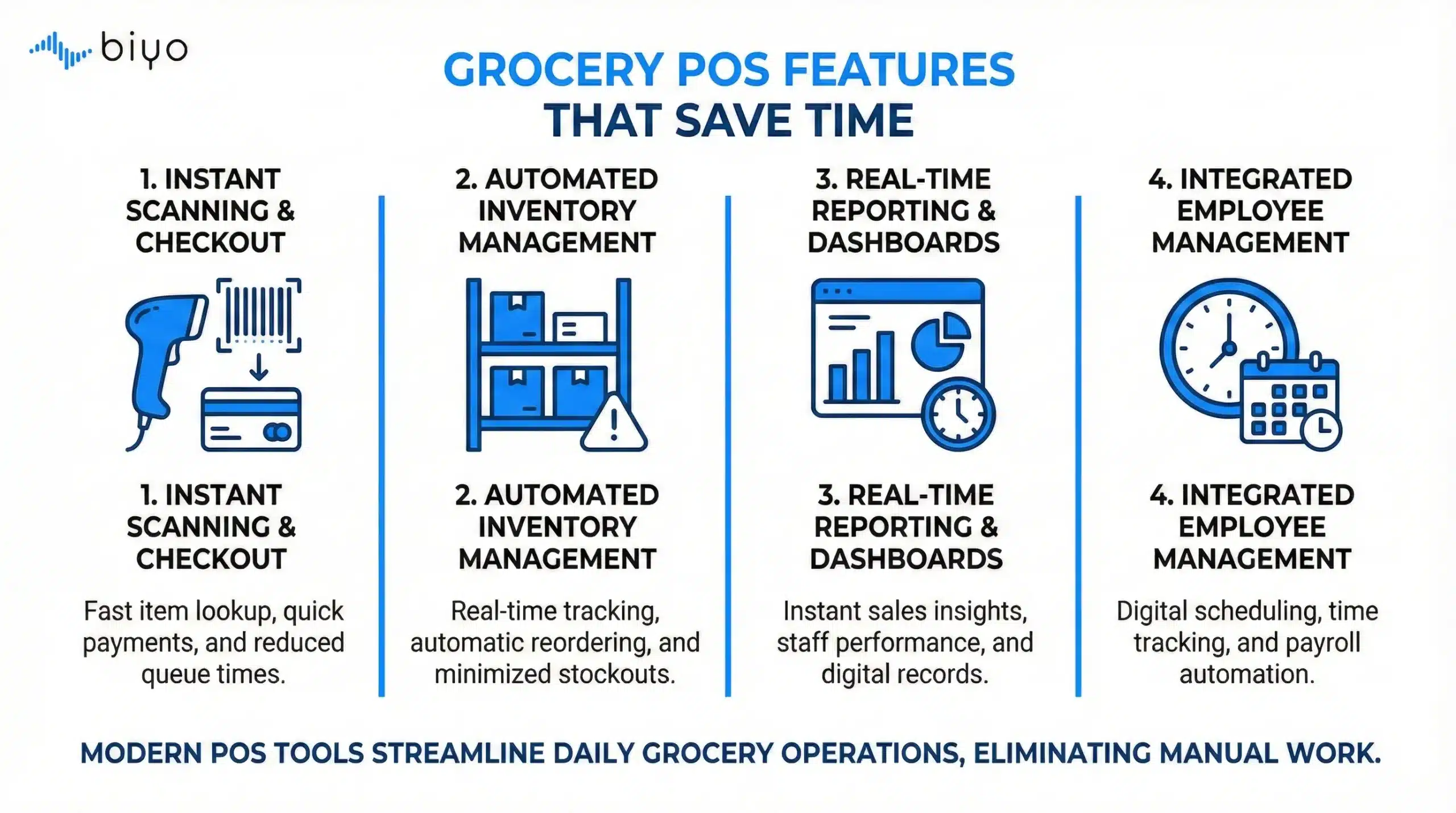 Inventory Automation That Eliminates Manual Work
Inventory tasks consume hours every week in grocery stores. Grocery POS Features That Save Hours Every Week target this problem through automation. Manual counts and spreadsheets no longer make sense.
Real Time Stock Updates After Every Sale
Real time stock updates keep inventory accurate without extra effort. Every sale adjusts inventory levels automatically. Staff no longer guess what is on hand.
Grocery POS Features That Save Hours Every Week rely on this automation to prevent constant recounting. Managers trust the data instead of verifying it manually.
Accurate stock levels reduce out-of-stock situations. Customers find what they need more often.
Confidence in inventory saves both time and frustration.
Automated Low-Stock Alerts
Low-stock alerts remove the need for constant shelf checks. The system notifies staff when items fall below set thresholds. Action happens before shelves empty.
When Grocery POS Features That Save Hours Every Week include alerts, managers stop walking aisles searching for problems. Instead, they respond only when needed.
This focused approach saves labor hours weekly. It also improves availability.
Automation replaces guesswork with clarity.
Barcode-Based Inventory Counts
Traditional inventory counts take days. Barcode-based counting speeds the process dramatically. Staff scan items instead of writing numbers.
Grocery POS Features That Save Hours Every Week turn inventory from a dreaded task into a manageable routine. Counts become faster and more accurate.
Because counts take less time, stores run them more often. Accuracy improves steadily.
Less time counting means more time selling.
Labor Time Savings Through POS Efficiency Tools
Labor costs rise quickly in grocery retail. Grocery POS Features That Save Hours Every Week help stores use labor wisely. Efficiency matters more than headcount.
Simplified Training for New Employees
High staff turnover creates training challenges. A user-friendly POS system reduces training time. New hires become productive faster.
When Grocery POS Features That Save Hours Every Week focus on simplicity, onboarding becomes smoother. Managers spend less time supervising basic tasks.
Clear screens and intuitive workflows guide staff naturally. Confidence grows quickly.
Shorter training equals faster returns.
Role-Based Access Controls
Role-based access limits what each employee can do. Cashiers focus on checkout, while managers handle pricing and reports. This separation saves time.
Grocery POS Features That Save Hours Every Week reduce mistakes caused by unauthorized actions. Staff stay within their responsibilities.
Managers avoid constant corrections. Workflows stay clean.
Clear roles protect efficiency.
Shift and Activity Tracking
Tracking staff activity through the POS highlights inefficiencies. Managers see where time goes during each shift. Adjustments become data-driven.
When Grocery POS Features That Save Hours Every Week include activity tracking, scheduling improves. Labor matches traffic patterns.
Overstaffing declines, while service remains strong.
Insight drives smarter labor use.
Pricing and Promotions Without Extra Effort
Pricing updates often steal hours from managers. Grocery POS Features That Save Hours Every Week streamline these tasks. Centralized control replaces manual changes.
Centralized Price Updates Across the Store
Changing prices item by item wastes time. Centralized updates apply changes instantly across registers. Managers avoid repetitive work.
Grocery POS Features That Save Hours Every Week allow quick responses to supplier changes. Prices stay accurate.
Consistency improves customer trust. Errors decline.
One change updates everything.
Scheduled Promotions and Automatic Expiry
Manual promotion removal causes problems. Scheduled promotions start and end automatically. Staff no longer remember dates.
When Grocery POS Features That Save Hours Every Week include scheduling, promotions stay controlled. Margin loss decreases.
Managers regain hours once spent fixing expired discounts.
Automation enforces discipline.
Price Consistency Across Channels
Inconsistent pricing creates confusion. A unified POS system keeps prices aligned across in-store and online channels.
Grocery POS Features That Save Hours Every Week eliminate customer disputes at checkout. Staff stop issuing overrides.
Clear pricing saves time and protects margins.
Consistency prevents conflict.
Real Time Reporting That Saves Management Hours
Reporting should support decisions, not consume time. Grocery POS Features That Save Hours Every Week focus on real-time insights. Managers stop chasing numbers.
Instant Sales Performance Dashboards
Dashboards show sales performance at a glance. Managers spot trends without running reports. Decisions happen faster.
When Grocery POS Features That Save Hours Every Week include dashboards, daily reviews shrink from hours to minutes.
Clarity replaces complexity.
Time saved becomes strategy time.
Inventory and Shrinkage Reports
Shrinkage drains profit and time. Real-time reports reveal losses early. Action follows quickly.
Grocery POS Features That Save Hours Every Week prevent long investigations. Issues surface immediately.
Managers focus on prevention instead of damage control.
Visibility protects both time and money.
Automated End-of-Day Summaries
Manual end-of-day processes waste time. Automated summaries close the day instantly. Reports arrive ready.
When Grocery POS Features That Save Hours Every Week handle closing tasks, managers leave on time. Stress decreases.
Consistency improves accountability.
End-of-day becomes effortless.
How Biyo POS Delivers Time Savings Every Week
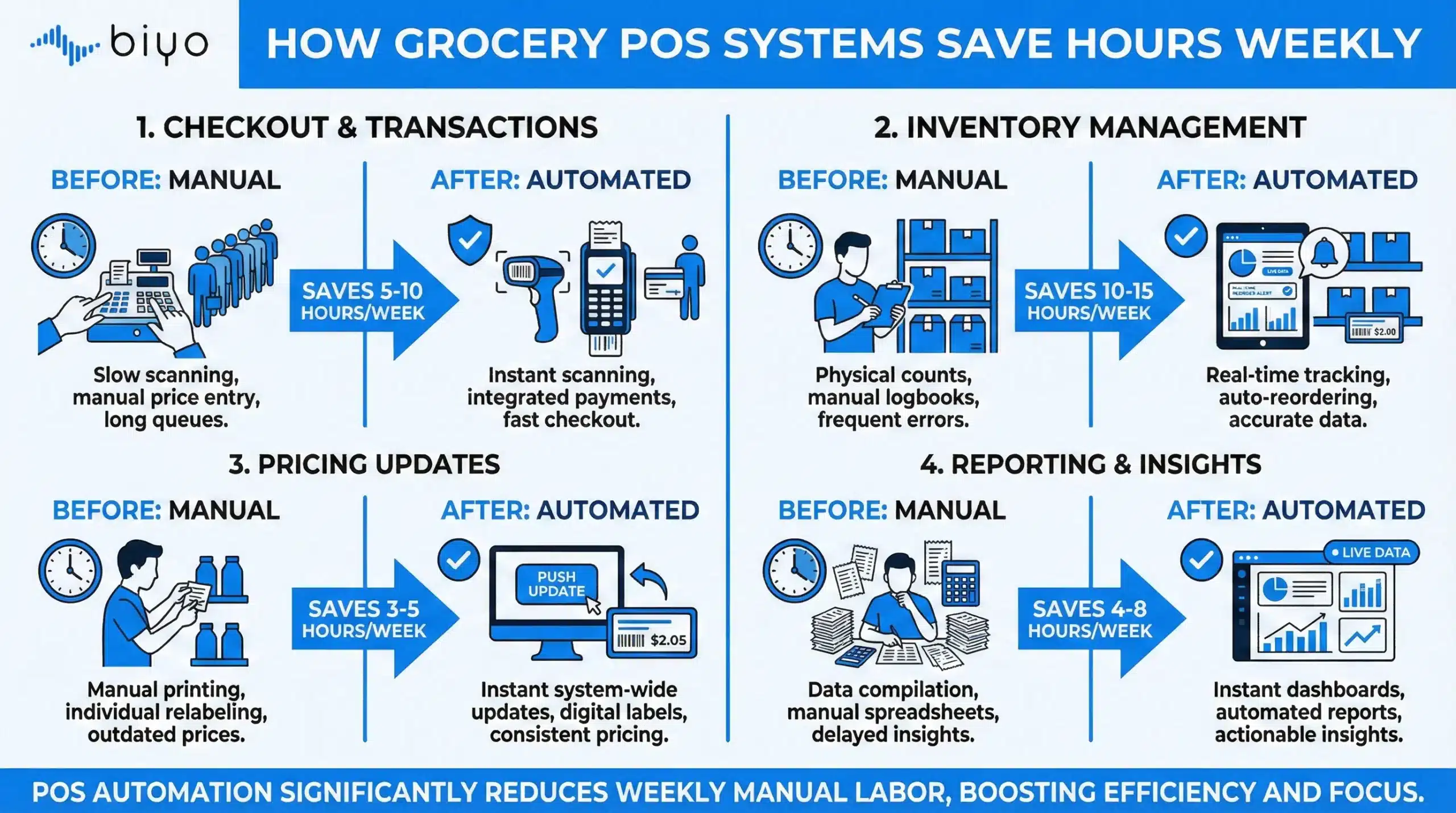 How Biyo POS Delivers Time Savings Every Week
Biyo POS delivers Grocery POS Features That Save Hours Every Week through fast checkout tools, real time stock updates, and powerful automation. From barcode scanning to inventory automation, Biyo POS removes repetitive work from daily grocery operations.
Biyo POS also supports centralized pricing, staff controls, and real-time reporting that keeps managers informed without extra effort. If you want to see these features in action, you can schedule a call for a personalized walkthrough. When you are ready to streamline your store, you can sign up here and start saving hours every week.
Frequently Asked Questions
What grocery POS features save the most time?
Barcode scanning, inventory automation, and fast checkout features deliver the biggest time savings.
How does a supermarket POS system reduce labor hours?
Automation removes manual tasks, while reporting and controls improve scheduling efficiency.
Are real time stock updates important?
Yes, real time stock updates prevent recounting and reduce out-of-stock situations.
Can POS efficiency tools improve staff training?
Yes, intuitive systems shorten training time and reduce supervision needs.
Is Biyo POS suitable for busy grocery stores?
Yes, Biyo POS is designed to handle high-volume grocery environments efficiently.